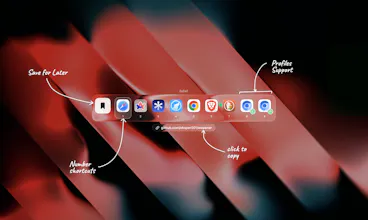
macOS only lets you pick one default browser, so every link gets dumped in the same place whether it fits or not. Wopener fixes that. Set it as default and it hands the choice back to you — click any link, a little glass picker pops up, tap the browser (or exact Chrome/Arc profile) you actually want. No rules, no setup. It just asks. Native macOS 26, lives in your menu bar, open source and free.
No reviews yetBe the first to leave a review for Wopener
Maker
📌
Hey Product Hunt 👋
I built Wopener because of one tiny thing that drove me up the wall: macOS only lets you pick one default browser. So a work Slack link, a random article, a localhost dev URL- all of it gets dumped into the same browser. Every time. I was constantly copy-pasting links between browsers like a caveman.
So I made the picker I always wanted. Wopener becomes your "default," then hands the choice back to you. Click a link, a little glass picker shows up in the middle of the screen, you tap the browser you actually want. It even knows your Chrome/Arc profiles, so work-me and personal-me stop fighting over tabs.
No rules to configure, no per-site memory, no setup wizard. It just asks. That was the whole design goal, get out of the way and let me choose in the moment.
It's native macOS 26, built with the new Liquid Glass stuff (genuinely fun to build), lives in the menu bar, and it's fully open source and free.
Would love your feedback, especially what other browsers/profiles you'd want supported. Roast it, I can take it 🙂
Report
Maker
One honest thing 👇
Wopener is free and open source, and it's gonna stay that way. But to ship it properly signed + notarized by Apple (so you don't have to fight Gatekeeper every time you open it), I need an Apple Developer membership — that's $99/year out of pocket.
If Wopener saves you from the wrong-browser dance and you wanna chip in, sponsoring the project helps cover that and keeps it actually installable for everyone. Even a few bucks goes straight toward notarization and keeping it maintained.
Sponsor link's on the GitHub repo. No pressure at all — using it, starring it, and telling me what to fix next helps just as much 🙏
One honest thing 👇
Wopener is free and open source, and it's gonna stay that way. But to ship it properly signed + notarized by Apple (so you don't have to fight Gatekeeper every time you open it), I need an Apple Developer membership — that's $99/year out of pocket.
If Wopener saves you from the wrong-browser dance and you wanna chip in, sponsoring the project helps cover that and keeps it actually installable for everyone. Even a few bucks goes straight toward notarization and keeping it maintained.
Sponsor link's on the GitHub repo. No pressure at all — using it, starring it, and telling me what to fix next helps just as much 🙏