Launched this week
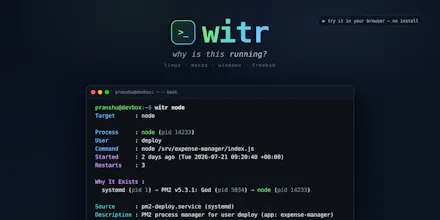
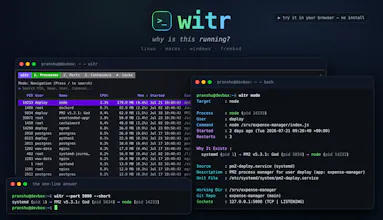
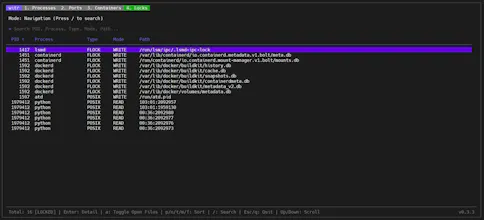
ps, top and lsof tell you what is running. witr tells you why. Point it at a process, PID, port, container or file and it traces the chain that explains it - systemd, supervisor, shell or cron - plus who started it, when, from where, and the warnings worth knowing. Run it bare for an interactive TUI with Processes, Ports, Containers and Locks tabs. Or script it: --short for a one-line chain, --json with real exit codes. One static Go binary for Linux, macOS, Windows and BSD.


ps and lsof telling me what but never why is a decent chunk of my debugging life. Two questions. Does the Containers tab pick up things Docker Desktop started, and does it do anything sensible under WSL2 where there's no systemd to trace back to? That's usually where I lose the thread.
witr
@dalemooney @dale_mooney Real results from Windows + WSL2 with Docker Desktop running.
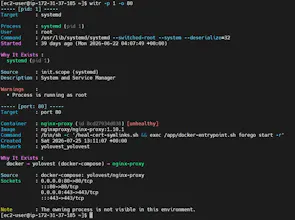
Docker Desktop containers are picked up. Container detection goes through the Docker API rather than the local process table, so it works even though Docker Desktop runs containers in its own VM where those PIDs don't exist in your distro at all:
That last line is deliberate. When the processes live in the Docker Desktop VM it tells you, rather than inventing a chain.
On systemd, I ran it inside the docker-desktop distro, which has no systemd at all and PID 1 is init, and it resolved the source from the cgroup:
Thanks for the question, and I hope you try it out.
@dale_mooney @pranshuparmar Appreciate you actually running it rather than telling me it should work. That's more than I expected and it answers both questions.
The line I'd single out is "The owning process is not visible in this environment." Most tools hitting that wall pick one of two bad options: invent a plausible chain, or return nothing and let you assume. Saying which side of the wall you're on is the whole value, and it's why the cgroup fallback is the impressive part rather than the container detection. You resolved the source without pretending you could see the owner.
One follow up, for the scripted path rather than the TUI, since that's how I'd consume it. Is that state distinct in --json and in the exit codes? Can a caller tell apart no owner exists, an owner exists but is unreachable from here, and the lookup itself failed? Those three want different handling, and if they collapse into one empty field the guessing just moves up a layer to where nobody can see it happening.
Installing it either way.
witr
@dale_mooney Thank you for the appreciation and a great follow up indeed. Here's what happens today:
So the json output is either a valid JSON or empty output with exit code. But the main concern that you raised stands, owner unreachable returns a JSON with exit code 0 is indistinguishable from a normal response with exit 0 unless you parse the JSON to extract 'Note' field which isn't the right way. I'll enhance error codes to handle this case distinctly.
@dale_mooney @pranshuparmar That table is exactly the answer I wanted, and you've spotted the same thing I was circling: the dangerous case is the one that currently looks like success.
One suggestion on the shape of the fix, since exit codes are hard to change once people script against them. Keep 0 meaning fully resolved and give unreachable its own code, rather than widening what 0 covers. That way the naive `if witr --json ...; then` stays honest for people who never read the docs, which is most of us.
And whatever code you land on, it's worth putting the same state in the JSON as a machine field rather than only in Note, something like resolution: unreachable. Otherwise the shell caller and the JSON caller are reading two different sources of truth about the same run, and they'll drift.
Good luck with the rest of launch day.
How deep does it trace - down to which file handle or socket a process holds? That's usually the part I'm actually hunting for.
witr
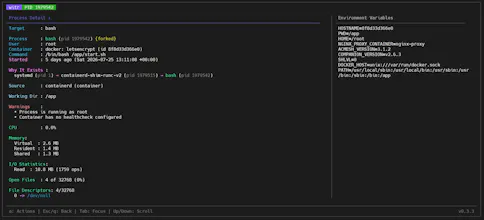
@kritishpuri Yes, it goes down to individual sockets and file descriptors (in --verbose mode). Sample output section:
It also works in reverse, which sounds closer to what you're actually hunting. --file finds which process is holding a file and gives you its full ancestry chain, and --port does the same for a socket. The TUI has a locks and ports tab for browsing interactively.
Thanks for the question, and I hope you try it out.
the single static Go binary shipping for linux, mac, windows and bsd with no runtime dependencies is the kind of boring, disciplined execution that makes a tool actually pleasant to drop on any box
witr
@phardinghy4670 Thank you for the awesome comment. Hope you try it out and like it.
Pythagora
witr looks fantastic. Huge congrats on shipping, and best of luck with the launch! 🚀
witr
@leon_ostrez Thank you! Really appreciate the kind words and support. Hope you enjoy using it.