WhimFiles is a native Mac file manager built around fast, real-time filtering. Filter by type, date, and size at once, browse dual-pane, open tabs, and find anything in seconds with fuzzy Go to Folder. Native and tiny (~9 MB). One-time $19.99, no subscription, with a 30-day free trial.
I wanted to have a basic file manager to help me clean out my Downloads folder, removing the things I didn’t need and easily moving other files to more permanent suitable locations.
It started out as a very basic file manager with good filtering options that genuinely helped me to quickly clean out my Downloads folder that had been left unkept for several years. Then as I thought of more features I wanted I added them. Some of them are:
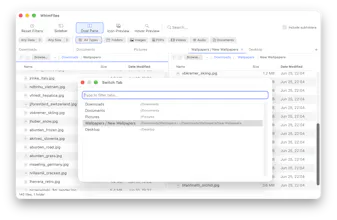
- Fuzzy go to folder/file where you only need to write a few letters of a full path, get suggestions and can jump to the correct path instantly
- Hover over a file to preview an image or PDF without opening it
- Dual-pane view and tabs that remember selected filters
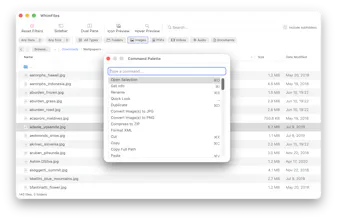
- Command palette to find actions fast
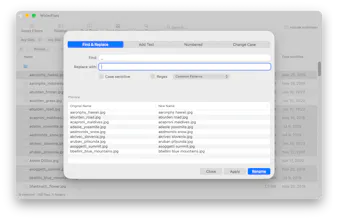
- Batch rename (with regex support and presets for common operations), image conversion (HEIC/WebP/AVIF to JPG/PNG), zip creation
- Bookmarks, Quick Look, single-click open, full keyboard control
And many other small quality of life features.
It's a native Mac app (no Electron), launches instantly, and the whole app is only around 9 MB. It has a 30-day free trial with a one-time purchase price of $19.99 (no subscription).
Report
No reviews yetBe the first to leave a review for WhimFiles