Launching today

Warden
Lock your Mac’s input. Let your AI agents keep working.
3 followers
Lock your Mac’s input. Let your AI agents keep working.
3 followers
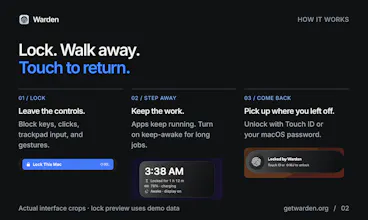
Step away while an AI agent, build, or render keeps running. Press ⇧⌘L and Warden blocks keyboard, mouse, trackpad, and gestures on every display, so a bumped key, kid, or cat can’t interrupt. Show progress or blur the screen, keep the Mac awake, and unlock with Touch ID or your password. It guards against accidental input; it doesn’t replace the macOS lock screen. 7-day free trial, then $8.99 once for up to 3 Macs. macOS 15.2+.



Hey Product Hunt, I’m Parth, the maker of Warden.
I wanted to step away from a long agent run without a bumped key or cat interrupting it, and still glance over to see progress.
Warden is a native menu bar app for that moment:
• Press ⇧⌘L to block keyboard, mouse, trackpad, and gestures across your displays.
• Keep progress visible or blur it, and keep the Mac awake while work continues.
• Unlock with Touch ID or your Mac password. Scripts can post progress with the opt-in CLI; unlocking stays with you.
It guards against accidental physical input. It doesn’t replace the macOS security lock or protect against software already running as you.
Try it free for 7 days, no card. Then $8.99 once for up to 3 Macs. Requires macOS 15.2+.
What do you usually leave running when you step away from your Mac?