
Virto 360 – Virtual Tour Platform
Free AI virtual tour software — 360° tours in your browser
7 followers
Free AI virtual tour software — 360° tours in your browser
7 followers
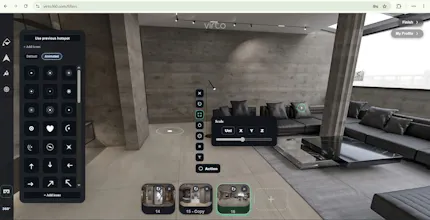
Virto 360 is free AI virtual tour software that runs entirely in your browser — no desktop app or plugins. Upload 360° panoramas, connect rooms with hotspots, polish scenes with AI object removal and filters, then share via link, QR code, iframe embed, or WebXR VR. Built for real estate agents, architects, hotels, museums, and 360° photographers who need professional walkthroughs without enterprise pricing or complex desktop tools. Free to start. No credit card.




Tried uploading a quick panorama from my phone and the hotspot linking was surprisingly intuitive. The AI object removal actually cleaned up a tripod reflection I'd been stuck on for ages. Solid for a free tool.
@zcan1758563 Thanks for trying it on your phone — that’s exactly the workflow we optimized for. Glad the hotspot linking felt natural and that AI cleanup saved that tripod shot. If anything felt rough on mobile, I’d love to know — we’re polishing that path every week.
Would love to see a simple floor plan overlay mode where you can drag hotspots on a 2D layout and have them sync to the 3D scenes, would make it way easier for clients to understand the flow of a property at a glance.
@melisrtekimejb Thank you so much for the feedback! A floor plan with linked panoramas is already on my roadmap, and I'm planning to include it in one of the upcoming updates.
Uploaded a few panoramas from a recent listing and the hotspot linking felt really intuitive. The AI object removal saved me from reshooting a room with a tripod in frame.
@zafer175063 Thanks for trying it on a real listing — that’s exactly the workflow we built for. Glad hotspot linking clicked quickly and that AI cleanup saved a reshoot. Anything that still felt slow or confusing on upload → publish? Happy to fix it.