
VEWiGN
Sync 2 phones to record & analyze form from multi-angles
8 followers
Sync 2 phones to record & analyze form from multi-angles
8 followers
VEWiGN is a multi-view video recorder designed for sports practice and form analysis. Easily pair a spare/older phone as a sub-camera via WebRTC to record from two angles simultaneously. Compare videos side-by-side with slow-motion, loop play, and built-in pose detection.


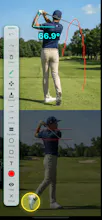


How well does the pose detection actually work for sports like golf or tennis where the swing happens really fast? Curious if it can track keypoints accurately or if it ends up glitching during quick movements.
@nisanurahraz
Hi Nisanur!
Great question. VEWiGN's pose detection is designed to handle fast movements like golf or tennis swings very effectively by leveraging the following pipeline:
1. High-Frame-Rate Extraction: When you analyze a video, VEWiGN extracts frames at up to 60 FPS (using FFmpeg). If you record your swing in 60 FPS, every single frame will be analyzed.
2. Frame-by-Frame Static Analysis: We run Google ML Kit's pose detector on every individual extracted static frame. Since the detector analyzes static images, its accuracy during fast movements depends mostly on the presence of motion blur in the video. If the video is recorded under good lighting (high shutter speed) and high frame rate (like 60 FPS on modern smartphones), the keypoint tracking remains highly accurate without glitching.
3. Frame-Synced Interpolation: During playback, VEWiGN uses a high-performance ticker that synchronizes with the video player's timeline. It performs linear interpolation (LERP) between the parsed frames. This ensures that the skeleton remains perfectly locked to your body even when you scrub the video frame-by-frame, pause at the exact moment of impact, or play it in slow motion.
4. Jitter Control (Pose Smoothing): To counteract any minor tracking jitter caused by extremely fast movement or motion blur, the app includes a customizable "Pose Smoothing" filter strength setting.
In short, as long as the video itself is clear (ideally shot at 60 FPS in good lighting to minimize motion blur), the pose detection will track your swing keypoints accurately! We highly recommend scrubbing frame-by-frame to analyze your form. Let us know if you have any other questions!
How reliable is the WebRTC connection between phones in practice, like does it hold up outdoors on a field or do you get lag/dropouts? Wondering if both clips stay perfectly synced for tight form comparison.
@vedatzoraphyai
Hi Vedat!
That's a very practical question! Here is how VEWiGN handles connection reliability and video synchronization in real-world scenarios:
1. High Stability via Local Network (Hotspot/Wi-Fi):
VEWiGN establishes a local connection between the devices. Because it does not rely on STUN/TURN servers to route data over the global internet, the WebRTC connection is highly stable and fast. Outdoors on a field, you can simply turn on Personal Hotspot (Tethering) on one phone and connect the second phone to it. Since the data travels directly between the devices via local Wi-Fi, it is highly reliable with minimal latency.
2. Wi-Fi/Hotspot Requirement:
Please note that global P2P connection via cellular data is not supported. Therefore, both phones must be on the same local network (connected to the same Wi-Fi router or one phone's hotspot).
3. Millisecond-Level Sync Adjustment:
Even if there is a minor lag or timing difference when recording starts, VEWiGN features a Sync Offset Adjustment tool on the playback screen. You can adjust the synchronization between the two videos down to the millisecond. This makes it incredibly easy to align key moments—like the exact frame of a golf impact or a tennis contact point—for a perfectly synchronized side-by-side comparison.
So yes, you can comfortably use it outdoors via tethering, and any slight timing offsets can be easily corrected during playback analysis! Let us know if you have any other questions!
Just to follow up on how you can actually use the Sync Offset tool in the app:
1. On the Video Analysis screen, display the Jog Dial by tapping the Playback Speed button on the bottom control bar.
2. Tap the button at the top-right of the Jog Dial (it is labeled "Seek" by default).
3. This switches the Jog Dial's mode to "Offset" (which is for adjusting video timing).
4. Now, simply rotate the dial. Turning it will adjust the synchronization offset of the second video frame-by-frame (or millisecond-by-millisecond) until the two videos align perfectly.
It is super quick and intuitive to do right after you record a swing on the field!
finally a recorder that just works with my old iphone as a second angle, no fussy setup. the side by side slow mo made it way easier to spot where my knees are collapsing on squats.
@duran257125
Hi Duran!
Thank you so much for the wonderful feedback!
I am absolutely thrilled to hear that! Reusing an old iPhone as a second-angle camera is exactly one of the core use cases I envisioned when developing the app. I wanted to make multi-angle recording accessible and hassle-free, without requiring users to buy expensive new equipment.
It is also fantastic to hear that the side-by-side slow-mo helped you spot your knees collapsing during squats. Form issues like that are notoriously difficult to catch from a single angle, so I am glad VEWiGN could help you identify it to improve your training.
Happy training, and please let me know if you have any feedback or feature requests as you continue using the app!