
Verismo — native screen studio for macOS
Record the screen. Ship the movie.
11 followers
Record the screen. Ship the movie.
11 followers
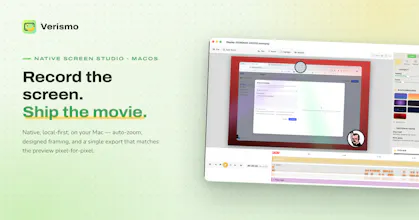
Verismo is a native macOS screen recorder and editor. Capture screen, mic, webcam, and cursor; polish with auto-zoom and designed backdrops; export a single MP4 that matches the preview pixel-for-pixel.


Payment Required
Launch Team

Framer AI AgentsDesign and publish professional sites with AI
Promoted
Verismo is a native macOS screen studio. It captures your display, mic, webcam, and every cursor move — then turns the raw take into a padded, auto-zoomed, beautifully framed video, entirely on your Mac. What you see in the editor is exactly what you export. The take is raw. The movie is yours.
Verismo は macOS ネイティブのスクリーンスタジオ。画面・マイク・ウェブカメラ・カーソルの動きをまるごと記録し、自動ズームと美しいフレーミングで、そのまま届けられる一本の映像に仕上げます。すべての処理はあなたの Mac の中で。編集画面がそのまま完成品に。素材は生のまま、映画はあなたのもの。
Verismo 是一款 macOS 原生录屏工作室:录下屏幕、麦克风、摄像头和每一次光标移动,再通过自动缩放与精致构图,把原始素材变成一部可以直接发布的视频。全程本地完成,所见即所得,预览即成片。素材是生的,成片是你的。
The notarized DMG supports CLI commands https://buymeacoffee.com/pinkbanana/e/553120
How it works: the CLI talks to the running GUI over XPC (agent protocol v0.4.0), auto-launching the app in the background — JSON in / JSON out. Put it on your PATH with:
sudo ln -sf "/Applications/Verismo.app/Contents/Helpers/verismo" /usr/local/bin/verismo
Command surface in this version (from CLI/Sources):
- version · capabilities · permissions
- record — start, stop
- edit — set-aspect, set-audio, transcribe, smart-trim, set-music, clear-music, set-layout, set-cursor, set-webcam, set-background, add-annotation, remove-annotation, exclude, …
- export, export-batch, presets
- library commands
Hey hunters 👋
I'm the solo dev behind Verismo — a native macOS screen recorder + editor I built because every "pro" screen recorder either cost a subscription, chugged my CPU, or made me hop between three apps just to get a demo GIF out the door. So most of this got built on nights and weekends — more than a few Friday nights, actually (there's a whole Friday Night theme buried in Settings as a nod to that: crimson backdrop, a spinning-vinyl webcam, comic avatars — try it, it's a vibe 🕺🔴).
What it actually does, underneath the fun stuff:
🎯 Auto-zoom from clicks — click clusters become smoothed zoom keyframes automatically, hand-editable after
🖱️ Smoothed synthetic cursor — styles, glow, click ripples, no more shaky raw mouse footage
🧑💻 Webcam without a green screen — Vision-based person cutout keys you onto the screen content
✍️ Annotations + Whisper transcripts — captions and text/arrow/highlight overlays, baked straight into export
📱 Every aspect ratio, one toggle — Auto, 16:9, 9:16 (Reels / TikTok / Shorts), 1:1, and 4:5 — reframe the same recording for every platform without re-shooting. Editor shows the exact output frame live, export honors it pixel-for-pixel (1080p tier → 1920×1080, 1080×1920, 1080×1080, 1080×1350)
The auto-zoom tracking is shockingly smooth, and the export really did match what I saw in the preview. Loving how lightweight it feels compared to the bloated editors I usually wrestle with.
@evket0ajr Thanks for the feedback!