Ultimate Settings Panel puts 250+ Windows settings, classic tools, network diagnostics and commands behind one search box, across 12 categories. Windows 11 ms-settings: deep links, diagnostics like sfc /scannow, DISM RestoreHealth, battery and Wi-Fi reports and Winsock resets, plus Windows Terminal, PowerShell 7 and winget. Every card has a Run button. Portable, no install. A web edition runs in any browser. Version 8.0 is a ground-up rewrite of a tool free since 2014. No telemetry.
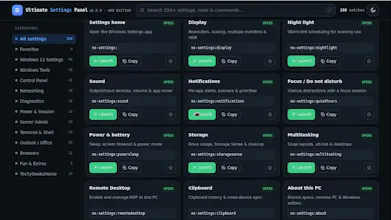
Hey Product Hunt! Ultimate Settings Panel has been around since 2014 — it started as a way to stop hunting through Control Panel for the same twenty things. Version 8.0 is a complete rewrite and the first one I've felt like showing anyone.
The old one was C#/WinForms sitting on MetroFramework, which stopped being maintained years ago. But the bigger problem was how it launched things: it wrote a script to disk and invoked it through mshta. That works, and it is also almost exactly the behaviour antivirus heuristics are built to catch — and they were right to be suspicious.
The rebuild is a small Go program (no CGO) that renders the panel in a Microsoft Edge WebView2 window, with a JavaScript-to-Go bridge doing the launching. Nothing gets dropped to disk now.
Rewriting also meant deleting a lot. Google Analytics, Internet Explorer, some telnet tricks that stopped working years ago, Google+ links. Added Windows 11 Settings, Terminal & Shell, modern diagnostics, favourites, themes and .bat export.
The web edition is the same panel as a single self-contained index.html — browsers can't launch programs, for good reason, so those items give you Copy and Get .bat instead.
Free, as it has been for eleven years. Happy to talk about the WebView2 approach or why I went to Go rather than staying on .NET.