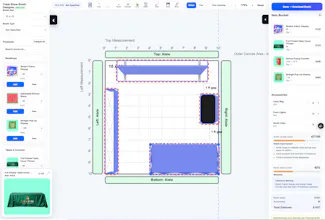
Planning a trade show booth is not just about selecting displays. You also need to understand booth space, visitor movement, product placement, accessibility, branding visibility, and approximate cost before finalizing the setup. Whether you are planning a small 10x10 booth, a 10x20 exhibit, or a larger custom trade show space, the tool helps you experiment with different booth configurations and product combinations in real time.
Plan, Visualize, and Optimize Your Booth Layout
The Trade Show Booth Designer Studio combines booth planning, product selection, layout visualization, and booth analysis into one interactive workflow.
The tool allows you to:
- Select booth size and booth type
- Configure booth surroundings and adjacent areas
- Search and place products on a live canvas
- Rotate and reposition booth elements
- Maintain alignment using guiding lines
- Analyze booth crowding and visitor movement
- Estimate approximate booth cost
- Download a shareable booth PDF
- Request a personalized quotation from our support team
This creates a much more practical booth planning experience compared to static sketches or basic mockups.
Report
Does the Studio let you import your actual booth dimensions or are you stuck choosing from preset sizes like 10x10 and 10x20?
Report
The real-time swapping between 10x10, 10x20, and custom footprints is genuinely clever, makes it easy to feel how visitor flow changes before committing to a layout.
Report
No reviews yetBe the first to leave a review for Trade Show Booth Designer Studio
Does the Studio let you import your actual booth dimensions or are you stuck choosing from preset sizes like 10x10 and 10x20?
The real-time swapping between 10x10, 10x20, and custom footprints is genuinely clever, makes it easy to feel how visitor flow changes before committing to a layout.