
Pocket Screen
Keep any Mac window visible in a floating mini screen
313 followers
Keep any Mac window visible in a floating mini screen
313 followers
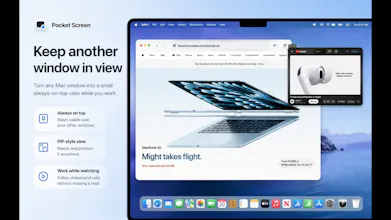
Pocket Screen turns the frontmost window on your Mac into a compact, always-on-top PiP-style view. Keep documents, chats, videos, or reference material visible while you work in another app—without constantly switching windows. Processing stays on your Mac.


this is one of those things that sounds small but I'd actually use daily, keeping a Zoom or a stream floating over other windows instead of alt-tabbing constantly. does it stay attached when you switch spaces/desktops or does it need to be re-pinned each time
@omri_ben_shoham1 Thanks, Omri!
You don’t need to re-pin it each time. Pocket Screen keeps the window attached when you switch Spaces. If the source window is on an inactive Space, the floating view temporarily hides to avoid showing a black or stale image, then automatically resumes when the source becomes available again.
How do you handle window resizing and aspect ratio changes when converting a full window to the mini PiP view?
@aymnart Thanks, Aymen!
The floating window can be resized freely, while the source content keeps its original aspect ratio and scales to fit rather than stretching.
If the source window itself changes size or aspect ratio, Pocket Screen updates the capture and reframes it automatically.
The single-display framing is the part that got me — I make music and my DAW eats the entire screen, so I'm constantly tabbing back to a YouTube tutorial or a lyrics doc and losing my place. Does the floating window survive over a fullscreen app, or does macOS shove it behind? Also nice call making Option+Cmd+P pin the frontmost window instead of asking me to pick from a list.
@lennoxbeflying Thanks, Ziang!
The floating window is designed to stay above full-screen apps. One limitation is macOS Spaces: if the pinned source window is on a different inactive Space, Pocket Screen temporarily hides and automatically resumes when that source Space becomes active again.
I’ll continue refining this behavior to make the experience as seamless and practical as possible.
this is one of those tools where the use case clicks immediately, i'm constantly alt-tabbing to check a doc while writing in another app. question on multi-monitor setups: does the floating window stay pinned to one display, or can you drag it across screens and have it remember where you left it next time you launch the app
@galdayan Thanks, Gal!
In the current version, the floating window can be dragged across displays like a normal macOS window, and Pocket Screen saves its last position. With the same monitor arrangement, it should generally reopen where you left it.
However, the current release wasn’t specifically designed for changes such as disconnecting or rearranging displays, so I can’t guarantee reliable restoration in every multi-monitor setup yet. I’m currently adding more display-aware position restoration and recovery for the next update, which I’m planning to submit to the App Store early next week.
honestly super useful for keeping docs open while coding. one thing though, would be great if you could set custom keyboard shortcuts to toggle which window becomes the floating view, right now i have to click through menus which kind of breaks the flow. a quick hotkey to swap the target window would make this way more seamless.
@bayraktuta26773 Thanks, Nehir!
Pocket Screen currently supports Option + Command + P to pin the frontmost window, but I agree that customizable shortcuts and a quicker way to switch the target window would make the workflow even smoother. I’ve added this to my improvement list.
@bayraktuta26773 Thanks again, Nehir! I’m currently finalizing an update that will let the hotkey switch the selected floating window to the current frontmost window without going through the menu. I’m aiming to submit it to the App Store early next week.
Very useful - however I can't figure out where to download it! Please can you help me?
@andrea_j Thanks, Andrea!
You can download Pocket Screen directly from the Mac App Store here: https://apps.apple.com/app/id6788211562
Sorry the download link wasn’t clear!
That app-by-app variance is what made a reliable paused signal hard for us too. What ended up working was ignoring per-app behavior and watching the frame's presentation timestamp: if the PTS stopped advancing for roughly a second we treated it as paused, since ScreenCaptureKit never fires an explicit stream-idle event. Saved us from special-casing each source. Good luck with the App Store push next week.