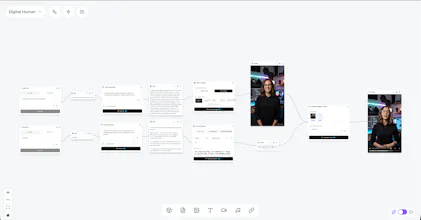
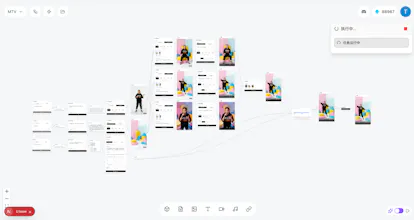
Every AI model lives in its own tool, so chaining text to image to video to lip-sync meant shuffling files by hand. TongFlow puts every model as a node on one canvas, for every modality, not just images. Add, transform, combine, run. Free to use, open source, runs locally.
No reviews yetBe the first to leave a review for TongFlow - Open-source GenAI studio
Maker
📌
Hey Product Hunt, maker here.
I built TongFlow because I was tired of being a human file-courier between AI tools. Great image model in one tab, video model in another, speech somewhere else, and me dragging files between them.
The idea that fixed it for me: every model is just a modality transform. Text to image, image to video, audio to text. Once they're all nodes on one canvas, you stop thinking about tools and start thinking about the result. You add a material, pick the next step, and the connection gets made for you. No manual wiring, no parameter panels.
The real point is the range. The same canvas does text, images, video, music, speech, lip-sync, even 3D, and you chain them however you want. A talking-head avatar, a short film from a paragraph, a music video, batch product shots, all the same three actions on a different graph. A few are running end to end in the gallery.
If you know ComfyUI: think that idea, but a node is a whole capability (text-to-image, lip-sync) instead of a low-level block, and it spans every modality instead of mostly images. The trade-off: less pixel-level control. It's for composing models into a result fast, not for custom sampler graphs.
A few specifics:
- It's free to run, not a 7-day trial. The GPU plugins use Modal's free tier (up to $30/month on H100/A100-class hardware), enough for a full pipeline.
- It's local-first and open source. Your files stay on your machine, and the whole thing is on GitHub.
- It's plugin based and backend-neutral, so any model, API or platform can plug in. I ship official plugins, you can write your own. Run them on your own GPU or cloud GPUs, your call. No lock-in: when a better model ships it gets wrapped as a plugin, so the studio keeps up instead of aging out.
- You don't rebuild a workflow every time. Save one, swap the inputs, and run the whole graph again in one click (Execute Mode). Or run it headless from Python with `run_workflow`, the same engine the app uses. A flow you got right once is one you keep using.
It's early and I'm one person. Some nodes are already on the canvas without an official plugin yet (a few video and audio ones), and I mark what's ready vs. planned in the README.
A few demos (talking-head video, a music video, basic image fusion) are in the gallery, and the workflows behind them are here: https://github.com/tong-io/tongf...
I'd love your feedback. What would you build first? AMA in the comments.
TongFlow v0.1.2 Released: https://github.com/tong-io/tongflow/releases/tag/v0.1.2