Most Mac timers hide behind a click. TimeBarX turns your menu bar into a live countdown, with a progress bar visible across every display so you always know how much time is left without breaking focus. Type timers naturally, automate with Shortcuts, Alfred, and Raycast, and resume perfectly after restarts. Zero tracking, no account, no subscriptions. Free forever, Launch month: Pro $2.99 ($5.99 after).
No reviews yetBe the first to leave a review for TimeBarX
Maker
📌
Hi Product Hunt 👋
I built TimeBarX because every Mac timer I tried had the same flaw: to know how much time was left, I had to interrupt myself. Click a menu bar icon. Hover. Hunt for a window. Each glance is a tiny context switch and 30 of them a day burns real focus.
So I made the timer the menu bar itself.
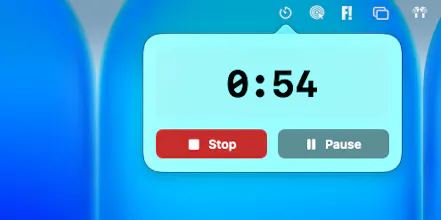
A thin progress bar drains across the top of every connected display in real time. You don't check the time. You see it. Always. Then you get back to work.
A few things that make it different from the other timers on the App Store:
🖥 Spans every display, perfectly in sync. One timer, four monitors, no math.
⌨️ Type it like a sentence. 25 min review PR → done. No sliders, no dropdowns.
🤖 Automation-first. URL schemes work with Shortcuts, Alfred, and Raycast. One keystroke starts a focus block.
🔁 Survives anything. Close the lid, restart, crash; TimeBarX saves the exact end time and resumes correctly.
🔒 Zero telemetry. No account, no analytics, no network calls. Mac App Store sandboxed, signed, notarized.
Pricing is simple: Free forever with the full core experience (progress bar on every display, slider input, completion effects, global hotkey, restart recovery). Pro is a one-time unlock, no subscription, no account, Family Sharing supported. Pro unlocks natural language input, custom colors, transparency, automation, and every future feature on the roadmap.
🎉 Launch promo: Pro is $2.99 for the first month after release (50% off the standard $5.99). If you buy during the launch month, you keep Pro forever at no extra cost — including every future feature.
What menu bar utilities have stuck in your workflow for years? I'd love to learn what makes one survive vs. get uninstalled in a week.




Hi Product Hunt 👋
I built TimeBarX because every Mac timer I tried had the same flaw: to know how much time was left, I had to interrupt myself. Click a menu bar icon. Hover. Hunt for a window. Each glance is a tiny context switch and 30 of them a day burns real focus.
So I made the timer the menu bar itself.
A thin progress bar drains across the top of every connected display in real time. You don't check the time. You see it. Always. Then you get back to work.
A few things that make it different from the other timers on the App Store:
🖥 Spans every display, perfectly in sync.
One timer, four monitors, no math.
⌨️ Type it like a sentence.
25 min review PR → done. No sliders, no dropdowns.
🤖 Automation-first.
URL schemes work with Shortcuts, Alfred, and Raycast. One keystroke starts a focus block.
🔁 Survives anything.
Close the lid, restart, crash; TimeBarX saves the exact end time and resumes correctly.
🔒 Zero telemetry.
No account, no analytics, no network calls. Mac App Store sandboxed, signed, notarized.
Pricing is simple: Free forever with the full core experience (progress bar on every display, slider input, completion effects, global hotkey, restart recovery). Pro is a one-time unlock, no subscription, no account, Family Sharing supported. Pro unlocks natural language input, custom colors, transparency, automation, and every future feature on the roadmap.
🎉 Launch promo: Pro is $2.99 for the first month after release (50% off the standard $5.99). If you buy during the launch month, you keep Pro forever at no extra cost — including every future feature.
What menu bar utilities have stuck in your workflow for years? I'd love to learn what makes one survive vs. get uninstalled in a week.
Jonathan