Launched this week

The Tab Dump
Close your browser. Keep your research. The 1-click Notion
10 followers
Close your browser. Keep your research. The 1-click Notion
10 followers
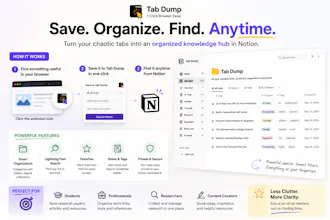
"I built a pre-made Notion board + Chrome extension workflow to save all your open tabs in 1 click. Sort them into 'Save Forever' or 'Delete Tomorrow' and finally close your browser. Includes free template and 2-min setup video."




this is such a relatable problem, love how simple the whole thing sounds. one thing though, would be cool if the extension could auto-categorize tabs by domain or topic instead of just dumping them into two buckets, basically let me tag them as work, research, shopping, whatever so the sort actually means something later.
@ehasta87614 Thanks so much! I'm really glad the problem resonated with you—that was exactly the goal.
I like your suggestion about auto-categorizing by domain or topic. Right now, I kept Tab Dump intentionally simple so it's quick to use, but smarter categorization with custom tags like Work, Research, Shopping, and more is definitely something I'm considering for a future update.
I really appreciate the feedback—it helps shape where the product goes next!
@ehasta87614 I was going to suggest the same, auto catogerization would help. Also a notification when this gets out of hand where the user is dumping tabs in to the system but has not visited the links say in 6months. Resurfacing them would be useful.
@xterra1111 That's a great suggestion—thank you! I really like the idea of resurfacing forgotten links after a few months. Auto-categorization and review reminders are definitely features I'll consider for future updates.
Genuinely useful for anyone drowning in 50+ tabs. The one-click save worked smoothly and sorting into "Save Forever" vs "Delete Tomorrow" made me actually confront my hoarding habits. Setup took about 3 minutes including the video.
@kazm4y6g Thanks! I'm happy it helped. Just curious—which part of the setup video did you find most useful?
Honestly this saved me from my usual 200-tab meltdown. The split between save forever and delete tomorrow is basically what I needed to actually close Chrome without panicking. Solid setup video too.
@erenapik Thank you so much! 😊 I'm really happy it helped. Just curious—did you try the full template from Gumroad, or are you referring to the Product Hunt preview? I'd love to hear what part you found most useful.
The Save Forever vs Delete Tomorrow split is such a clever nudge. Most tab managers treat everything as equal, but forcing that binary choice is what actually gets you to close the browser.
@aysimayasanfkz Thank you so much for your feedback! 😊 Just curious, did you get a chance to try the template yourself, or is this based on the Product Hunt preview?
The 1-click save into Notion is such a thoughtful touch, no fiddling with folders or tagging. Love that the two-bucket system actually forces a decision instead of letting saved tabs rot in limbo.
@berkkise Thank you! I'm curious—which part do you think is more valuable: the one-click save or the Save Forever / Delete Tomorrow system?