Tabber - Windows and Apps Switcher

Tabber - Windows and Apps Switcher

Switch windows and apps with a Hotkey.

0 followers

Switch windows and apps with a Hotkey and improve your experience and workflow. See contents of windows Real-Time when switching windows. Select from a variety of options and customize Tabber how you prefer.
Tabber - Windows and Apps Switcher gallery image
Launch tags:iOSMacProductivity
Launch Team
ace.me
ace.me
Your new website, email address & cloud storage
Promoted

What do you think? …

Lucian Boiangiu
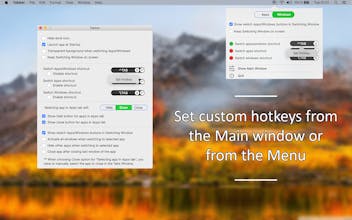
Switch windows and apps with a Hotkey and improve your experience and workflow. Activate wanted windows and apps with Tabber Window Switcher which is a Command+Tab alternative to switch windows. See contents of windows Real-Time when switching windows. Switch Apps and Windows with a shortcut or set a custom shortcut to switch windows or to switch apps. Improve your workflow and focus on your preferred windows / apps by easily and quickly switching to them. Select from a variety of settings and customize Tabber as you prefer. Quickly navigate through apps and windows with Tabber by using a Shortcut and improve your workflow and experience -------- Features --------- • Switch visible windows and apps with a custom set Shortcut • Switch apps with a custom set Shortcut • Switch windows with a custom set Shortcut • See the windows contents Real-Time in the window switcher • Close windows by pressing the 'X' button for each window in the window switcher • Select to switch Apps or Windows when pressing the 'Switch apps/windows shortcut' by pressing the Apps/Windows buttons in the Menu Window or by activating the option to see the Apps/Windows buttons in the window switcher • Set behavior to show app, hide app or close app when switching to an Application • Show Hide app and Close app buttons for each application when switching apps • Activate all windows when switching to selected app • Hide other apps when switching to selected app • Close app after closing last window of the app • Hide dock icon • Launch app at startup