Replace messy emails, WhatsApp, Slack, and Google Drive with one beautiful client onboarding portal. Create reusable onboarding templates, collect documents, track progress, automate reminders, and deliver a premium client experience from one workspace. Start free.
No reviews yetBe the first to leave a review for Synerdeck
Maker
📌
Hey Product Hunt! 👋
Every service business knows this conversation:
"Did you get my file?"
Client onboarding is still scattered across emails, WhatsApp, Google Drive, Slack, and PDFs. It's messy, repetitive, and wastes everyone's time.
That's why I built SynerDeck.
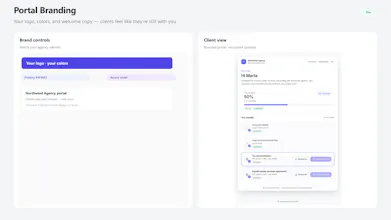
It gives every client one branded onboarding portal where they can:
✅ Upload files
✅ Complete tasks
✅ Track progress
✅ Receive reminders
✅ Always know what's next
No accounts. No endless follow-ups. Just a simple magic link.
Why SynerDeck?
• 🎨 Branded client portals
• 🔗 Magic link access
• 📋 Reusable onboarding templates
• 📂 Secure document collection
• 📊 Live progress tracking
• 🔔 Smart reminders
• 👥 Team collaboration
Whether you're an agency, freelancer, consultant, accountant, or lawyer, SynerDeck helps you onboard clients faster and look more professional.
I'd genuinely love your feedback. Every comment helps us improve.
Thanks for checking out SynerDeck! ❤️
🌐 https://www.synerdeck.com
Report
How does Synerdeck handle sensitive client docs from a security and compliance standpoint, especially compared to just using Drive or Dropbox?
Report
Maker
@bedirhaney1e Great question — this is exactly why we didn’t want Synerdeck to feel like “another shared Drive folder.” Synerdeck keeps client docs in a private bucket, served with short-lived signed URLs — not permanent “anyone with the link” shares. Traffic is TLS, data is encrypted at rest, and row-level security isolates each workspace. Uploads are type/size-checked (optional malware scan), and team access is role-based. On Scale you also get document access audit logs.
Drive/Dropbox are great general storage; Synerdeck is built for onboarding — the right files, for the right client, with progress and a trail — not a shared folder people can wander through.
Finally tried Synerdeck and the onboarding templates saved me from another messy Notion hack. The document tracking view actually makes it obvious where clients get stuck, which I didn't realize I needed.
That's exactly the problem I wanted to solve. Too many onboarding processes end up spread across Notion, email, Drive, and chat. Hearing that the templates and document tracking helped makes all those late nights worth it.
Really appreciate you giving Synerdeck a try and taking the time to share your experience. More improvements are on the way!
Report
love how the templates actually look like something i'd send to a real client, not another clunky internal tool wearing a suit. the progress tracking feels especially considered.
That’s exactly the bar we built for: templates that feel like your studio wrote them, not like software your client has to decode. The progress view is deliberate too — clients should always know what’s done, what’s next, and that they’re not lost in another admin portal.
If you run a real onboarding through it, I’d love to hear what still feels rough. That’s the feedback that actually shapes the product.
Report
love how clean the onboarding flow looks, feels like something i'd actually want to send to a client instead of dreading the back and forth
That was one of my biggest goals while building Synerdeck. Client onboarding should feel professional and effortless, not like a chain of emails and endless "just following up" messages.
I'm glad it gives you something you'd actually feel confident sending to clients. Thanks for checking it out and sharing your thoughts! 🚀
How does Synerdeck handle sensitive client docs from a security and compliance standpoint, especially compared to just using Drive or Dropbox?
@bedirhaney1e Great question — this is exactly why we didn’t want Synerdeck to feel like “another shared Drive folder.”
Synerdeck keeps client docs in a private bucket, served with short-lived signed URLs — not permanent “anyone with the link” shares. Traffic is TLS, data is encrypted at rest, and row-level security isolates each workspace. Uploads are type/size-checked (optional malware scan), and team access is role-based. On Scale you also get document access audit logs.
Drive/Dropbox are great general storage; Synerdeck is built for onboarding — the right files, for the right client, with progress and a trail — not a shared folder people can wander through.
More: https://www.synerdeck.com/security
Finally tried Synerdeck and the onboarding templates saved me from another messy Notion hack. The document tracking view actually makes it obvious where clients get stuck, which I didn't realize I needed.
@bulemkudakj89z Thank you, that genuinely means a lot! 😊
That's exactly the problem I wanted to solve. Too many onboarding processes end up spread across Notion, email, Drive, and chat. Hearing that the templates and document tracking helped makes all those late nights worth it.
Really appreciate you giving Synerdeck a try and taking the time to share your experience. More improvements are on the way!
love how the templates actually look like something i'd send to a real client, not another clunky internal tool wearing a suit. the progress tracking feels especially considered.
@miratngl8j5s That means a lot — thank you.
That’s exactly the bar we built for: templates that feel like your studio wrote them, not like software your client has to decode. The progress view is deliberate too — clients should always know what’s done, what’s next, and that they’re not lost in another admin portal.
If you run a real onboarding through it, I’d love to hear what still feels rough. That’s the feedback that actually shapes the product.
love how clean the onboarding flow looks, feels like something i'd actually want to send to a client instead of dreading the back and forth
@havvamehel Really appreciate that, thank you! 😊
That was one of my biggest goals while building Synerdeck. Client onboarding should feel professional and effortless, not like a chain of emails and endless "just following up" messages.
I'm glad it gives you something you'd actually feel confident sending to clients. Thanks for checking it out and sharing your thoughts! 🚀