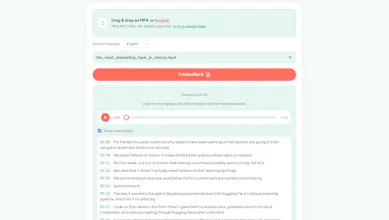
MP4 to Transcript turns spoken video into text right in your browser — no upload, no server, no wait. It recognizes speech in English, Spanish, Japanese, Chinese, or Korean and transcribes it in that same language, then lets you export as TXT, SRT, or VTT for captions or notes. Great for interviews, lectures, meetings, and podcasts you'd rather not upload anywhere.
Hey Product Hunt! 👋
I built MP4 to Transcript because every "free" transcription tool I tried either capped my file length, watermarked the output, or quietly required an account (and an upload to someone else's server) before giving me anything back.
So this one works differently: it runs entirely in your browser using WebAssembly. Your video never gets uploaded anywhere — the whole thing, speech recognition included, happens on your own machine. That also means no size limit tied to a plan, no queue, and no watermark, because there's no server-side cost driving those restrictions in the first place.
Right now it can recognize speech in English, Spanish, Japanese, Chinese, or Korean (pick the language your video is actually spoken in, and it transcribes in that same language — it's not a translator), and you can export the result as TXT, SRT, or VTT depending on whether you need plain notes or timed captions.
It's part of a small family of privacy-first, browser-based tools I've been building — this is the one I personally use most, since I record a lot of calls and hated sending them off to a third party just to get a transcript back.
Would love feedback, especially on transcription accuracy for non-English languages and any edge cases (long files, unusual accents, etc.) — happy to fix bugs fast this week. Thanks for checking it out!