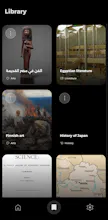
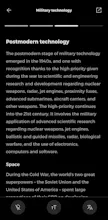
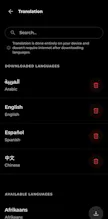
Soma displays Wikipedia articles in a Reels-style feed for quick discovery, offering a comfortable and neatly organized reading experience - Full Customization: Set your interests, languages, font size, and Dark mode. - Horizontal Reading: Browse articles in a clean, sideways layout. - Offline Access: Save articles to read anytime without internet. - Local Translation: Translate into 55+ languages instantly offline.
No reviews yetBe the first to leave a review for Soma
Maker
📌
hola 👋
I created Soma to make exploring Wikipedia articles a more practical and organized experience for everyone. The app displays content in a modern layout, turning dense articles into a quick-discovery feed, followed by a comfortable reading experience.
here is everything you can do with soma:
- Discover new topics through a smooth vertical scroll that displays images, titles, and short descriptions for quick browsing.
- Open any article and read it comfortably using a clean, sideways layout.
- Set your favorite topics and preferred languages to get articles tailored to your taste.
- Save any article directly to your device so you can open and read it anytime, anywhere, without an internet connection.
- Enjoy a clean and organized design focused entirely on the content without distractions.
- Control the font size and switch between Dark Mode and Light Mode for your visual comfort.
- Copy links with a single click or quickly open the article in your external web browser.
- Translate articles into more than 55 languages instantly using a built-in offline tool that requires no internet connection.
I would love to hear your thoughts and feedback on the app. Thanks :>