Sociana is a specially designed application integrated with Asana, enabling you to plan and publish LinkedIn content directly from your Asana workspace.
No reviews yetBe the first to leave a review for Sociana
Maker
📌
🔥 💜 Hey, I'm Germain, co-founder of sociana 👊
I love working on @Asana , but I was tired of copying between Asana and LinkedIn, so I decided to create sociana with Kévin, my partner.
What is Sociana?
Sociana is a specially designed application integrated with Asana, enabling planning and publishing of LinkedIn content directly from your Asana workspace. With sociana, teams can create, approve and publish LinkedIn posts without ever leaving Asana, streamlining workflows and eliminating the need to copy and paste between platforms.
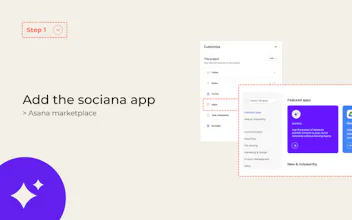
You can install sociana and start your free 7-day trial at Sociana + Asana (Install sociana from your Asana project (customise > apps))
How to install sociana?
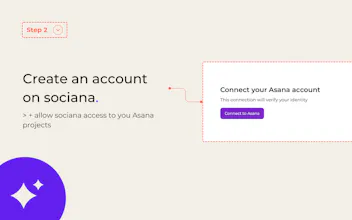
1. Install sociana, create a sociana account, authorize sociana to retrieve your Asana projects
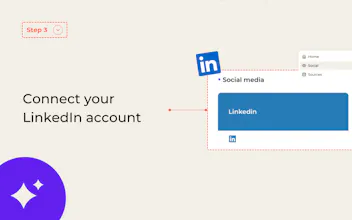
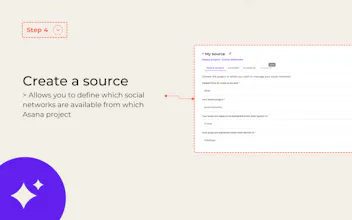
2. Connect to your LinkedIn account on sociana and Create a source:
a source allows you to set a default publishing time, select the project from which you want to access your LinkedIn account (and the LinkedIn company pages you administer), and also the sections. The section in which sociana should retrieve your posts ready to be posted, and another section in which posted tasks will be automatically shifted and completed.
config sources
3. Then, when you return to Asana, you can configure your tasks to be published whenever you like (if you don’t specify a time, the default date from your source will be taken into account).
config socials
Now it’s your turn!
Here’s what you can publish on LinkedIn from Asana:
- Text formats supported: Underline, Bold, Italic
- Media supported: (100MB limit per Asana)
- Images (between 1 and 20)
- Videos (.mp4)
- Documents (.pdf = carousel)
- Mentions: You can mention company pages. (LinkedIn’s API doesn’t support mentions of personal profiles properly at the moment.)
- Hashtags and external links are taken into account.
If you have any further questions, please contact us.
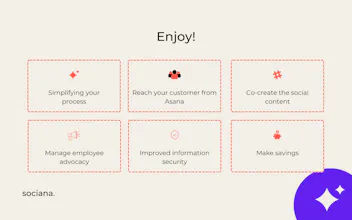
The combination of Asana + sociana is the winning combo. You gain in creativity and efficiency.
You no longer have gaps in my editorial calendar.
How to get sociana?
Install sociana from your Asana project (customise > apps)
The next networks to be connected to Asana will be: Instagram, Facebook, Threads, etc.
For more resources, please visit our website.
Thanks for your support
💜Kévin and Germain - Founders of sociana
Report
💎 Pixel perfection
Game-Changer for Content Planning on Asana! 🚀
I'm an Asana consultant working closely with several marketing and communication teams. Many of them manage content planning within Asana, and Sociana is exactly the kind of tool that can take their efficiency to the next level.
Sociana eliminates the hassle of switching between platforms and manually copying content. This is a game-changer for my clients, helping them streamline their content approval processes and maintain a well-structured editorial calendar.
@igor_den Yes, as long as you prepare them properly. Justin Welsh has given away a lot of free content on the subject to reuse the same content but on different axes.
Game-Changer for Content Planning on Asana! 🚀
I'm an Asana consultant working closely with several marketing and communication teams. Many of them manage content planning within Asana, and Sociana is exactly the kind of tool that can take their efficiency to the next level.
Sociana eliminates the hassle of switching between platforms and manually copying content. This is a game-changer for my clients, helping them streamline their content approval processes and maintain a well-structured editorial calendar.
It’s a perfect addition to their Asana setup! 🚀
@roman_hubsana This makes Asana a complete tool.
It will boost employee advocacy management 👊
🦄 💜 New social network available from Asana
Publish on Instagram without leaving Asana!
Thanks to the sociana app, you can now publish to Instagram (in addition to LinkedIn) without leaving Asana.
You can publish your posts, reels, stories and carousels from Asana!
Simply download the sociana app from your project and let us guide you.
You can consult this help center if you need it, or contact me via LinkedIn.
See you soon on the networks,
Germain
AI Ideal Customer Profile creation
Automating posts saves a ton of time!
@igor_den Yes, as long as you prepare them properly. Justin Welsh has given away a lot of free content on the subject to reuse the same content but on different axes.