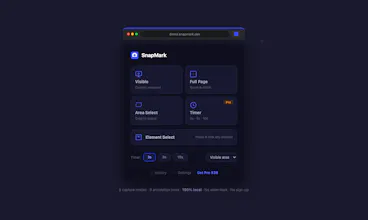
SnapMark is a privacy-first screenshot and annotation tool for Chrome. Everything happens locally — nothing is ever uploaded. 5 capture modes: Visible, Full Page, Region Select, Element Picker, Timed Capture. 8 annotation tools: Arrow, Rect, Ellipse, Text, Freehand, Blur, Step Numbers, Crop. Free: all modes, all tools, PNG + clipboard, no watermark. Pro $39 lifetime: JPEG/WebP/PDF, Timed Capture, 100 history, 100 undo. No subscription. Built with vanilla JS. ~50KB. 100% local. No sign-up.
No reviews yetBe the first to leave a review for SnapMark - Screenshot Annotation Tool
Maker
📌
I was a paying FireShot user for years, but they started putting watermarks even on paid plans — and recently killed
their lifetime option to go subscription-only. Awesome Screenshot forces cloud uploads. Lightshot deletes your screenshots. There wasn't a tool that combined privacy + no watermark + one-time payment, so I built one.
Tech: vanilla JS + Canvas 2D, ~50KB. Full-page stitching uses 50px overlap + gradient fusion to eliminate seams from sticky headers. License server is Cloudflare Workers + D1. Everything else is local.
Free is genuinely functional — all 5 capture modes, all 8 annotation tools, no upsell walls. Pro is $39 once.
Happy to answer questions about the build, CWS submission, or full-page stitching. Thanks for checking it out
Report
Love that it runs fully offline and the blur tool actually works in-browser without a fuss. The Element Picker nailed the exact button I wanted first try, which is rare.
Report
Maker
@cansutokmalosf Thank you for the positive feedback! We're pleased the offline functionality, blur tool, and Element Picker precision met your expectations.
Report
Maker
@cansutokmalosf Thanks for the kind words! We designed the blur tool to work entirely client-side for privacy, and it's awesome to hear the Element Picker hit the right element on your first attempt. If you run into any edge cases, feel free to let us know!
Love that it runs fully offline and the blur tool actually works in-browser without a fuss. The Element Picker nailed the exact button I wanted first try, which is rare.
@cansutokmalosf Thank you for the positive feedback! We're pleased the offline functionality, blur tool, and Element Picker precision met your expectations.
@cansutokmalosf Thanks for the kind words! We designed the blur tool to work entirely client-side for privacy, and it's awesome to hear the Element Picker hit the right element on your first attempt. If you run into any edge cases, feel free to let us know!