Launching today

Sketchy
Sketchy creates in-chat, interactive, visual explanations
2 followers
Sketchy creates in-chat, interactive, visual explanations
2 followers
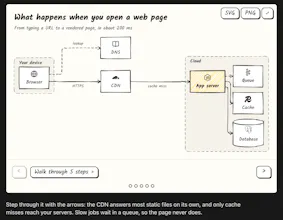
Sketchy turns AI explanations into interactive, hand-drawn diagrams. Map your app’s architecture, trace a request from button to database, and click any linked node to open its source file. Use Sketchy in Claude or set it up in Cursor via npm. Draw freehand on the canvas or export to Excalidraw to keep editing. The model sends a compact scene description, and Sketchy handles layout and rendering without spending model tokens on either. Free and open source.


Free
Launch Team

AWS Startup AdvisorPersonalized AWS guidance that meets you where you’re already building
Promoted
Hi Product Hunt, I'm David, a student from Germany.
I built Sketchy because I got tired of AI explaining everything in walls of text. Sketchy lets Claude answer with interactive, hand-drawn diagrams: hover for details, or click through a step-by-step mode.
How it works: LLMs are bad at coordinate math, which is why raw SVG from a model ends up with overlapping boxes. In Sketchy, Claude only outputs a compact JSON scene with nodes, edges, groups and steps. elkjs handles the layout and orthogonal edge routing, and rough.js renders it in a hand-drawn style. Follow-up edits keep existing nodes in place, even when back-edges are added, so you can compare versions of a diagram.
Benchmark: With Sonnet in Claude Code, Sketchy averaged 686 output tokens per answer vs 962 for plain text, about 29% fewer. Cost came out at $0.58 vs $0.61. The first diagram in a conversation costs slightly more.
Also included:
Repo diagrams where clicking a node opens the file in VS Code, Cursor or Zed (desktop extension / Claude Code)
Arduino/ESP32 code to circuit diagrams (~50 parts from wokwi-elements)
Photo labeling with a local Florence-2 model (small ~280 MB up to large ~3.1 GB)
Export to SVG/PNG
Free and open source (MIT), available as a Claude chat skill or as an MCP extension for Claude Desktop and Claude Code.
Feel free to try it out and leave your Feedback!