
Sigoo MCP Router
Control MCP tool access for AI agents
2 followers
Control MCP tool access for AI agents
2 followers
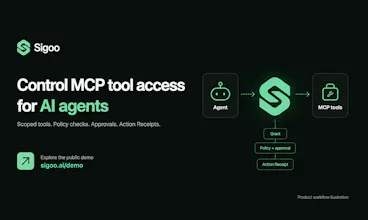
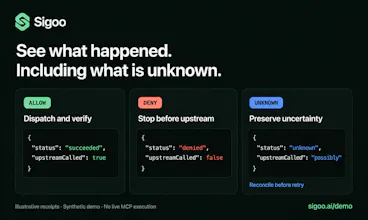
Sigoo gives AI agents scoped access to MCP tools. Set permissions, check policies, require approvals, and inspect Action Receipts. Explore a no-login synthetic demo showing allowed, denied, and unknown outcomes.
Hi Product Hunt — I'm the maker of Sigoo.
If you remember the earlier SIGOO launch, that product converted videos into GIFs. Sigoo has since changed direction. This launch introduces Sigoo MCP Router, a tool-access and execution control layer for AI agents.
The problem it addresses is straightforward: connecting an agent to a tool should not automatically authorize every action that tool can perform.
Sigoo separates the workflow into four steps:
• Connect MCP capabilities behind one endpoint.
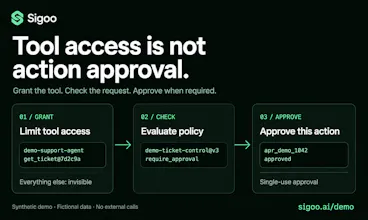
• Grant each agent access to specific tool versions.
• Check policies and require approval where configured before execution.
• Inspect an Action Receipt showing the outcome and its supporting evidence.
Agents use three Meta Tools to search permitted capabilities, execute a tool, and retrieve an action record. An uncertain result stays unknown rather than being presented as a success.
You can explore the no-login demo here:
https://sigoo.ai/demo
The demo uses fictional support data and illustrative receipts. It runs in the browser and does not connect accounts, create credentials, or call a real MCP server.
For protocol examples:
https://sigoo.ai/quickstart
Sigoo is in Founder Beta. The demo is not a production benchmark, and an Action Receipt is not a security certification or a guarantee of an external outcome.
If you're building agents that use external tools, where is the hardest part today: deciding what they can access, getting approvals right, or understanding what happened after execution?
I'd appreciate concrete workflows and technical feedback.