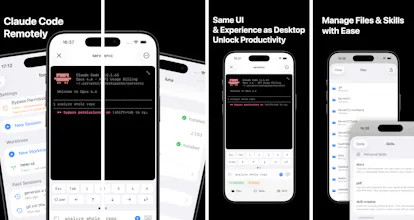
An iOS app purpose-built for Claude Code & Codex. Connect to your servers via SSH and get the full desktop experience on iPhone. What makes it unique: 1. Run multiple Claude Code sessions in parallel across servers 2. Keep sessions alive after closing the app (tmux persistent sessions) 3. Watch coding results in real time via built-in VNC Remote Desktop 4. Access private servers with built-in Tailscale — no system VPN. Manage workspaces, MCP, Skills, and Git worktrees — all from your pocket
Hey everyone! I'm the solo developer behind ServerCC.
I use Claude Code every day, and I wanted to keep using it when I'm away from my desk. There are two existing ways to do this, but neither felt right:
**Generic terminal apps** — You can SSH into your server and run Claude Code, sure. But terminal apps aren't designed for this workflow. The interaction experience is clunky — navigating sessions, switching contexts, and especially typing input to Claude Code on a mobile keyboard feels painful.
**Official remote control & web-based solutions** — These work, but they throw away all the muscle memory and techniques I've built up using Claude Code on desktop. It's a completely different interaction model. I didn't want to relearn how to use a tool I already know well.
So I built ServerCC — a native iOS app that gives you the same Claude Code experience as desktop, over SSH. The same UI patterns, the same workflows, just on your phone.
Along the way, features grew out of my own needs:
- I got tired of VPN hassles when connecting to my home server remotely, so I integrated **Tailscale** directly into the app — connect with just an auth key, no system VPN needed.
- While using Claude Code to write UI code, I kept wanting to see the results without switching to my computer. That led to **VNC Remote Desktop** — now I can watch UI changes and verify builds in real time, right on my iPhone while Claude Code is still working.
- **Persistent sessions** and **parallel execution** came naturally — keep Claude running after closing the app, and run multiple sessions across servers at once.
The app is free to use with 1 server. I'd love to hear your feedback — what would make this more useful for your workflow?
Report
No reviews yetBe the first to leave a review for ServerCC