
SEO Signal
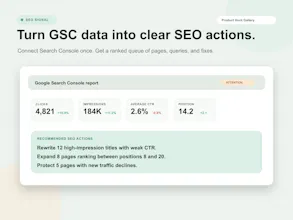
Turn Google Search Console data into clear SEO actions.
25 followers
Turn Google Search Console data into clear SEO actions.
25 followers
Connect GSC to find a prioritized queue of pages to refresh, titles to rewrite, rankings to protect, and deeper opportunities that are hard to reach. Connect GSC once Keep project data synced without manual exports. Catch new and lost pages Track content groups Track ranking movement Follow target queries, position bands, and page-one movement. See recent changes Keep clicks, impressions, CTR, and position shifts visible. Rank work by priority




Using google search console data to help drive SEO decisions is a good idea! What makes your product better than just exporting the data and passing it to claude code to analyze and help drive SEO decisions?
Hey Product Hunt 👋
I built SEO Signal because I was spending too much time inside Google Search Console every day.
GSC has the most valuable SEO data, but every time I opened it, I felt like I had to start from scratch again.
Same filters.
Same exports.
Same manual checks.
Same questions:
Which pages are losing traffic?
Which pages should I refresh first?
Which keywords are close to page one?
Which pages have impressions but poor CTR?
Where is the biggest SEO opportunity hiding?
Another problem: the GSC interface only lets you export up to 1,000 rows.
For any site with a bit of traffic, 1,000 rows is not enough. A lot of useful signals are buried deeper in the data.
So I built SEO Signal on top of the Google Search Console API, where I can access the full dataset and turn it into a repeatable SEO workflow.
The idea is simple:
Your SEO tool should remember how you work.
SEO Signal helps you:
- find pages that are losing clicks
- discover keywords close to page one
- identify low-CTR pages with high impressions
- group and track important content sections
- monitor new and lost queries
- talk to your own SEO data with AI
For me, refreshing pages that already have traffic is always the first priority.
It is usually the fastest way to grow organic traffic, because the page already has visibility. Sometimes improving the title, description, and content angle can double CTR and bring in a lot more clicks without creating a brand new page.
SEO Signal is my attempt to make that workflow faster:
connect GSC, understand what changed, find the biggest opportunity, and decide what to update next.
Would love your feedback.
Features:
- SEO Dashboard: View website-level Google Search Console performance in one place. - Reports Overview: Analyze clicks, impressions, CTR, average position, and SEO trends. - Content Groups: Group related URLs and track topic or page-type performance. - Rank Tracking: Monitor keyword position changes using GSC average position data. - Opportunity List: Find pages and queries with the highest SEO growth potential. - Page Movement: See which pages are gaining or losing organic visibility. - Page Indexing: Review page-level search visibility and performance signals. - CTR Pages: Find pages with high impressions but low click-through rate. - CTR Queries: Identify search queries where better snippets could earn more clicks. - New Pages: Discover URLs newly appearing in Google Search. - Lost Pages: Detect pages that lost search visibility. - New Queries: Find new keywords your site is starting to rank for. - Lost Queries: Spot keywords that disappeared from recent search data. - Top URLs: See your best-performing organic search pages. - Top Queries: See your top search queries by clicks and impressions.
Feature
Name
Description
Dashboard
SEO performance overview
View your connected websites, SEO health, recent performance, and key Google Search Console signals in one central dashboard.
Reports Overview
Full GSC report summary
Get a high-level view of clicks, impressions, CTR, average position, trends, country share, device share, and SEO performance changes over time.
Content Groups
Track groups of related pages
Group URLs by topic, folder, page type, or business goal, then monitor how each content group performs in Google Search Console. Useful for tracking blogs, landing pages, product pages, and topic clusters.
Rank Tracking
Track keyword position trends
Save important keywords and monitor their Google Search Console average position over time. See current rank, starting rank, best rank, ranking changes, clicks, and impressions.
Opportunity List
Find SEO wins to prioritize
Automatically identify pages and queries with the highest optimization potential, such as pages losing traffic, keywords near page one, and low-CTR opportunities.
Page Movement
See pages gaining or losing traffic
Compare page performance across periods to find which URLs are growing, declining, newly visible, or losing search visibility.
Page Indexing
Understand indexed page performance
Review page-level visibility and performance signals to understand which URLs are appearing in search and how they contribute to organic traffic.
CTR Pages
Find pages with low click-through rate
Discover pages with strong impressions but weak CTR, so you can improve titles, meta descriptions, and search snippets.
CTR Queries
Find search queries with low CTR
Identify queries where your site appears in search but does not earn enough clicks. Use this to improve page relevance, titles, and SERP messaging.
New Pages
Monitor newly visible pages
See URLs that recently started receiving search impressions or clicks, helping you spot fresh SEO momentum.
Lost Pages
Detect pages losing visibility
Find URLs that stopped receiving search impressions or clicks, so you can investigate ranking drops, indexing issues, or content decay.
New Queries
Discover new keywords
See new search queries your site has started appearing for, helping you uncover fresh content opportunities and emerging demand.
Lost Queries
Recover lost keyword visibility
Identify queries that disappeared from your recent Search Console data, so you can investigate ranking drops or content relevance issues.
Top URLs
See best-performing pages
Review the URLs driving the most clicks and impressions from organic search. Useful for understanding what content is already working.
Top Queries
See best-performing keywords
Review the search queries bringing the most visibility and traffic to your site, so you can double down on proven organic demand.
We’re offering a 14-day free trial for launch week.
If you use Google Search Console often, connect your site and see what SEO opportunities are hiding in your data.