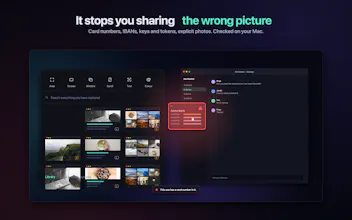
Scry reads every screenshot on your Mac, so you can search the words inside them months later. It also looks before you share: drag out a shot holding a card number or a private photo and it turns red and says so. All on device. No account, no server.
Hey Product Hunt š
I take a lot of screenshots. Then they sit in a folder with names like Screenshot 2026-03-14 at 11.42.07, and the thing I wanted to remember is gone. Scrolling that folder looking for one picture is how I spent a genuinely stupid amount of time.
So I built Scry around the part every screenshot app skips: what happens after you press the shortcut.
The mini library. Every capture drops into a drawer under the menu bar. It stays there, so you don't go hunting in Finder. Hit space to preview, right-click for actions, and drag a picture straight out of the menu bar into Slack, an email, Figma, anywhere ā without ever opening a window or touching a folder. Most days I never leave this.
The main library. Everything you've ever captured, in one window: favourites, collections, filing rules that put shots where they belong, a duplicate finder, and a Recently Deleted you can undo from. Search by app, colour, date ā or by the place a photo was taken, read from the photo's own camera data. Type "Dubai" and the Dubai photos come back.
How it reads your screenshots. Two passes, both on your Mac, and each shot carries a tag telling you where it got to:
⢠Light (L) ā every picture gets this. The text is read and a one-line description is written. Text and summary become searchable straight away.
⢠Deep (D) ā a vision model actually looks at the picture: objects, colours, what's happening in it. Everything becomes searchable.
Deep only runs when your Mac is plugged in and idle, so it never heats your laptop or eats your battery while you're working. You can also point it at a single shot and say "deep scan this now".
It checks before anything leaves. Screenshot folders are full of things you did not mean to send: a bank page, an API key, a photo that isn't a screenshot at all. Drag out a picture with a card number, an IBAN, a key or a person in it, and the tile turns red and tells you what it found. It never blocks you. It just will not let you do it blind. There's also a one-click button that covers everything private in a shot with solid bars.
All of this runs on your Mac. No account, no server, no upload ā the models are on your machine. I have nothing to sell your data to and nowhere to put it.
The rest is what you'd expect done properly: 14 capture shortcuts, scrolling capture, text and colour grabs, an editor with 17 tools, backdrops and frames.
It runs free for 7 days with everything switched on ā no card, no account. If it doesn't earn a place, delete it.
Launch price: $18 until 17 October, then it goes to $24. One-time payment, lifetime updates, two Macs. macOS 14+ on Apple silicon.
I'll be here all day ā ask me anything, and tell me what's missing. š®