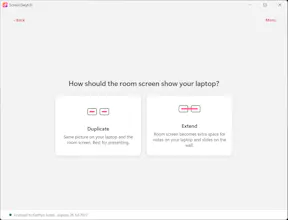
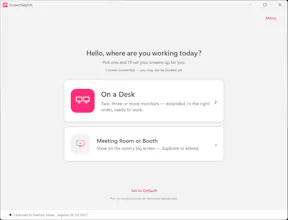
Sit at a new desk and your monitors are in the wrong order, mirrored, or plain chaos. ScreenSwytch sorts them in one click: dock your laptop, tell it which screen’s on your left, and every monitor snaps into the right place and order — no dragging windows, no digging through Windows display settings.
No reviews yetBe the first to leave a review for ScreenSwytch
Maker
📌
ScreenSwytch came out of a problem that hot-desking created and never solved.
You sit down at a different desk, plug into the dock, and Windows brings your monitors up in the wrong order. They're mirrored, on the wrong primary, with your taskbar and Start menu stranded on the screen you're not even looking at.
Windows won't remember a layout when the hardware keeps changing underneath it, and the traditional fix of fiddling through display settings, or building a fragile profile for every possible dock and desk, falls apart the moment someone moves.
We wanted to kill that daily two minutes of friction for good. So instead of asking the software to guess or remember, ScreenSwytch asks you the one thing it genuinely can't know, which is which screen is on your left, and from that it puts every monitor in the right order, sets the correct primary, and extends your desktop, all in a single click. It works at any desk, with any dock, on any monitors, which makes it just as useful for an IT team rolling it out across a hybrid workforce as it is for the person sitting down each morning.
The goal was simple: make your screens just work, the second you sit down.
Report
Finally a fix for the daily plug-in shuffle at my standing desk - one click and my laptop dock remembers which side the ultrawide belongs on. Surprised it actually picked up my third display on the first try without me tweaking anything.
Report
Maker
@kemaltzly Hey there, thanks for the positive feedback, hope the trial runs well for you - happy to hear any feedback you may have, as I am keen to develop this further if more is needed on the app. Thanks!
Report
the dock once, tell it which side, done approach is genuinely clever. most display tools still make you drag things around every single time. feels like someone who actually deals with this weekly finally got tired enough to build it.
Report
Maker
@veli366888 Yup that's exactly the reason why we built it! - Hope you have a good time with the trial.
Finally a fix for the daily plug-in shuffle at my standing desk - one click and my laptop dock remembers which side the ultrawide belongs on. Surprised it actually picked up my third display on the first try without me tweaking anything.
@kemaltzly Hey there, thanks for the positive feedback, hope the trial runs well for you - happy to hear any feedback you may have, as I am keen to develop this further if more is needed on the app. Thanks!
the dock once, tell it which side, done approach is genuinely clever. most display tools still make you drag things around every single time. feels like someone who actually deals with this weekly finally got tired enough to build it.
@veli366888 Yup that's exactly the reason why we built it! - Hope you have a good time with the trial.