Screenslice is built for people on ultrawides or large monitors who hate sharing their entire screen. It mirrors any selected region into a standard 1920×1080 window, so Meet and Teams can capture it cleanly. You get a movable overlay and freeze frame without reorganizing your whole desktop.
No reviews yetBe the first to leave a review for Screenslice
Maker
📌
I built Screenslice because I kept running into the same problem on video calls: I wanted to share part of my screen, but Meet/Teams usually forced me to choose between sharing one window or my entire monitor. That gets especially bad on ultrawides.
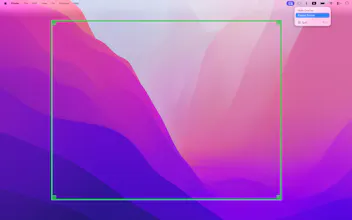
Screenslice solves that by letting you draw a region over any part of your screen and turning it into a clean shareable window that conferencing apps can capture normally. I also added freeze frame to make it practical in real calls when you need to reorganize private windows or take a quick look at your notes.
Would love feedback on whether this solves the problem the way you’d expect, because it definitely does the job for me.
If we only share a part of the screen, what does it show to cover the rest of the frame?
Report
Maker
@iamanantgupta 👋 the app only captures the selected region and outputs a fixed share window. There isn’t any "rest of the screen" visible outside the selected area - everyone on the call can only see what inside of the green frame. Hope this clarifies the functionality ✨
GrowMeOrganic
If we only share a part of the screen, what does it show to cover the rest of the frame?
@iamanantgupta 👋 the app only captures the selected region and outputs a fixed share window. There isn’t any "rest of the screen" visible outside the selected area - everyone on the call can only see what inside of the green frame. Hope this clarifies the functionality ✨