
Savvy
An assistant that whispers what to say during a meeting
119 followers
An assistant that whispers what to say during a meeting
119 followers
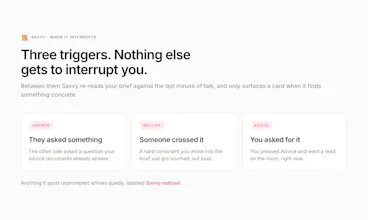
Savvy is a macOS meeting assistant grounded in your own documents, not the open web. Point it at a folder and it builds a versioned brief per client. In the meeting it stays quiet, then speaks up for exactly three reasons: they asked a question your brief answers, someone crossed a red line you set, or you pressed Advice. Every card cites its source. Documents, indexes and transcripts stay on your Mac; only excerpts and the audio stream leave. Apple Silicon, macOS 13+. Open source, MIT.




Free
Launch Team

Framer AI AgentsDesign and publish professional sites with AI
Promoted
Hey Product Hunt 👋
Every AI meeting tool I tried joins the call and mails you a summary afterwards. That helps the archive, not the conversation. What I needed was help during the call, and the answer was usually sitting in a document I had already read twice.
So I built Savvy.
Point it at a folder of documents and it builds a versioned brief per client. During the meeting it stays quiet. It speaks up for exactly three reasons:
1. They asked something your brief already answers.
2. Someone crossed a red line you set.
3. You pressed Advice.
Every card cites the document it came from, so you can check it before you say it.
It runs on your Mac. Files, indexes and transcripts stay there; only excerpts and the audio stream leave it. Apple Silicon, macOS 13+. Open source, MIT: https://github.com/jamalavedra/savvy
If you take client calls, what do you keep open on the second screen today?