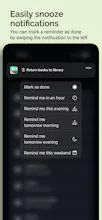
Add a new Reminder in one tap from your lock screen. Due reminders stay in your notification center until you mark them as done by swiping them away or snooze for later. Preset times make scheduling reminders a breeze, and the widget lets you know what's next.
@sgroiga My main gripe with the built-in Reminders app is that it is so cumbersome to add a new reminder. And if you want to schedule it for later, it requires many more taps. It is just too bloated in my opinion.
My aim here was to make a minimalistic Reminders app that focuses on getting the job done in as few taps as possible.
Click the lock-screen widget -> Type in your reminder -> Click save and you are done! ⚡️
The reminder will stay in your notification center until you swipe it away, at which point it is marked as completed.
Also, don't get me started on how many times I have accidentally marked a reminder as done through the widget of the default Reminders app...
All in all, I am proud to have created a simple tool that will let you remember the important things, and free up brain power to actually do what you need to 🧠
Report
congrats! any reward system/gamification developed for this?
@ella_chen52 Thanks Ella! No, I didn't think of that 🤔 But it's a great idea. Maybe show stats of how many reminders are completed in a week, month etc? Let me know if you have other ideas!
@chandula Later this year! Follow to stay tuned. I can also add you to an emailing list that will get notified when it launches (and no spam, I promise).
For someone like me who receives numerous notifications, this feature is excellent as I no longer have to worry about missing important messages due to an overload of notifications.



Bookmer
AnyTracker - track anything!
AnyTracker - track anything!
Coinfella
AnyTracker - track anything!
Flex-Worthy Templates
AnyTracker - track anything!
AnyTracker - track anything!
AI HomeDesign
AnyTracker - track anything!