React-DomPicker

React-DomPicker

Jump from browser to code in seconds

11 followers

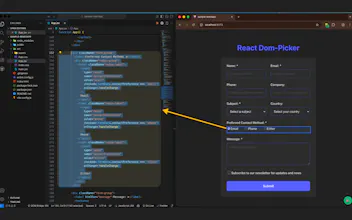
React-DomPicker: Click any element in your browser → jump straight to its React code in VS Code. The missing link between your UI and codebase. Works with Next.js, Vite, CRA, Remix + any React framework. Full Tailwind & ShadCN support. Save hours debugging & navigating complex codebases. Just click what you see, edit what matters. ⚔ Setup: Install Chrome extension + VS Code companion šŸŽÆ One click from UI to source code šŸš€ 10x faster component discovery Ship faster. Debug smarter.
React-DomPicker gallery image
Free
Launch Team
Intercom
Intercom
Startups get 90% off Intercom + 1 year of Fin AI Agent free
Promoted

What do you think? …

Odyssey
Maker
šŸ“Œ
As a developer working on large React codebases, I was constantly frustrated by the disconnect between what I saw in the browser and finding the actual component code. The typical flow was: inspect element → guess component name → search in VS Code → open wrong file → search again → finally find it 5 minutes later. Multiply that by 50 times a day... you get the picture. The "aha" moment: What if I could just click ANY element in my browser and instantly jump to its source code? No searching, no guessing, just click and code. That's why I built React-DomPicker. It bridges your browser and VS Code, making component discovery instantaneous. Some cool things it does: Works with any React framework (Next.js, Vite, CRA, Remix) Full Tailwind/ShadCN support (knows exactly which classes are where) Handles complex component trees and dynamic renders Zero config for most setups Technical note: It uses a Chrome extension + VS Code extension combo. The browser extension identifies the React fiber node, traces it back to source, and the VS Code extension opens the exact file and line. Would love to hear how you currently handle component discovery in your React projects! What's your biggest pain point when navigating large codebases? P.S. - If you work with React daily, I genuinely think this will save you hours every week. Give it a try and let me know what you think! šŸš€