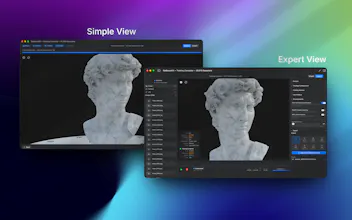
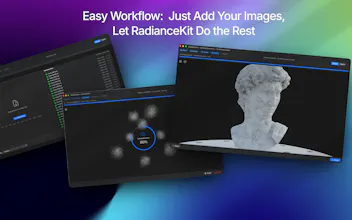
RadianceKit is the first native macOS app for 3D Gaussian Splatting. Drop in photos or video of any object or scene — it aligns the cameras, trains the model, and renders a photorealistic 3D reconstruction, all locally on your Mac's GPU. No Python, no CUDA, no cloud. Simple Mode for one-click results, Scene-Class Presets (Render/Outdoor/Indoor), and full Expert control. Export to 6 formats, orbit videos, and web viewers. M1+, $7.99 one-time, 3-day trial.
Hey Product Hunt!
I'm Björn, a solo developer from Germany. I built RadianceKit because I was fascinated by 3D Gaussian Splatting but frustrated by the workflow: install Python, set up CUDA, run COLMAP, fiddle with command-line scripts... all on a Linux box or a beefy NVIDIA rig.
I thought: this should just be an app. Drop in photos, get a 3D scene back.
So I rewrote the entire pipeline in Metal for Apple Silicon. No external dependencies, no cloud — everything runs locally on your Mac. In the latest version even the camera alignment (Structure-from-Motion) is native, so there's no COLMAP to install anymore. And there's a live 3D preview while training, so you can watch your scene come to life in real time.
Some things I'm proud of:
- Simple Mode that genuinely works with one click
- Scene-Class Presets (Render / Outdoor / Indoor) that tune the pipeline for what you're actually capturing
- Native on-device SfM — the whole pipeline, photos to splat, runs sandboxed on your Mac
- Export to pretty much every Gaussian Splatting format out there
- Localized in 18 languages, in-app guide included
I'm also working on an iPhone companion app — capture with LiDAR + ARKit on the phone, train on the Mac.
I'd love to hear what you think. If you have photos of something you'd like to turn into 3D, give it a shot — the trial is free for 3 days. And if you're curious about performance on your specific Mac model, let me know — I'm collecting data points across different Apple Silicon chips.
Happy to answer any questions here!
Report
native metal splatting with no python/cuda is wild — the step that always bit me was camera alignment on low-overlap captures. did you roll your own sfm or lean on a colmap-equivalent underneath?
@qifengzheng Thank you very much for your comment. Two paths at the moment. For object and indoor captures it can lean on apple's realitykit (photogrammetrysession) for camera alignment, which is sandbox-safe and solid on apple silicon. But the main rail is the app's own native swift + metal sfm pipeline, built end to end (features, matching, geometric verification, pose graph, bundle adjustment) so there's no python, no cuda, and no colmap binary to install. Camera alignment on low-overlap captures is exactly the tricky part, and more frame overlap with a slow, parallax-rich orbit buys you a lot. Colmap (as an external workflow) stays available as an option for large general outdoor sets, but the native path is the default now and keeps everything local and install-free.
RadianceKit
native metal splatting with no python/cuda is wild — the step that always bit me was camera alignment on low-overlap captures. did you roll your own sfm or lean on a colmap-equivalent underneath?
RadianceKit
@qifengzheng Thank you very much for your comment. Two paths at the moment. For object and indoor captures it can lean on apple's realitykit (photogrammetrysession) for camera alignment, which is sandbox-safe and solid on apple silicon. But the main rail is the app's own native swift + metal sfm pipeline, built end to end (features, matching, geometric verification, pose graph, bundle adjustment) so there's no python, no cuda, and no colmap binary to install. Camera alignment on low-overlap captures is exactly the tricky part, and more frame overlap with a slow, parallax-rich orbit buys you a lot. Colmap (as an external workflow) stays available as an option for large general outdoor sets, but the native path is the default now and keeps everything local and install-free.