Launching today

Quinjet
Git, pull requests and CI logs in one terminal UI
15 followers
Git, pull requests and CI logs in one terminal UI
15 followers
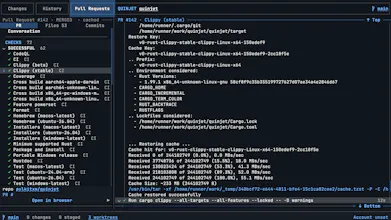
Quinjet is a keyboard-first Git interface for the terminal. Stage files, read syntax-highlighted diffs, browse history, and open any pull request with its full conversation, reviews and live GitHub Actions logs. Rust-fast, mouse-friendly, thirteen themes.



Launch Team

CloudflareStill paying to deploy your apps? Try Cloudflare Workers for free
Promoted
Hey Product Hunt,
For the early part of my career I lived in VS Code. It did everything I needed. The editor was there, and when AI tooling started scaling up the chat panel showed up in the same window, and the autocomplete was genuinely good. I had no reason to leave.
The piece I was really attached to, though, was the source control panel. I tried plenty of other Git tools over the years and none of them felt the same. What kept me there was the staging model: one list showing what is staged and what is not, so I could see exactly what was going into a commit before I made it.
Then the agentic CLI tools arrived, Claude Code, OpenCode and the rest, and I started living in my terminal instead. I ended up building a bunch of small tools for myself there. Quinjet is one of them.
It is that same source control panel, in the terminal. Changed files on the left, a syntax-highlighted diff on the right, stage and unstage with a keypress, and the same window also holds history, branches, stashes and pull requests, with GitHub Actions logs you can open inline instead of reaching for a browser tab.
It is MIT, written in Rust, and installable with Homebrew, apt, Winget, cargo or a one-line script. Everything the interface does has a command-line equivalent, all of them speak --json, and the live readings take --watch, so you can script whatever you just pressed a key for.
I would love to know what breaks for you, especially on large repositories and unusual fork setups...