No reviews yetBe the first to leave a review for PPT.AI
800+ templates AND multilingual support? You've just automated the most painful 2 hours of any workweek. That 'smart structuring' feature is the silent MVP - no more awkwardly placed bullet points! Cheers to your launch!
@rani_zagita Thank you! 🙌 We're so glad the smart structuring stood out — it's one of our favorite features too. Here's to saving those painful hours every week! Appreciate the support!
Report
🔥 **"Death to Death by PowerPoint!"** 🔥
PPT.AI just automated the worst part of your job:
⚡ Cursor-like magic for slides – transform bullet points into stunning decks
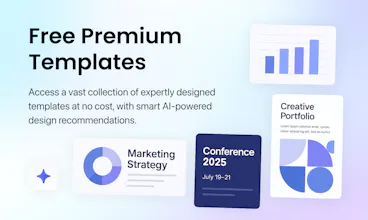
🎨 Smart templates that actually look professional
⏳ 95% faster than fighting with PowerPoint’s garbage defaults
Real talk:
1. What’s your biggest PowerPoint pain? (Mine: wasting hours on formatting that no one notices…)
2. Would you trust AI to build your slides?(Or do you still micromanage every text box?)
3. Vote: Better design or faster creation – which would save you more sanity?
👇 Try it free & roast your old slides in the replies. #ByeByePowerPoint
Report
🔥 "PowerPoint just got disrupted - and your boss will never know you used AI!" 🔥
Ranked #4 on Product Hunt for a reason:
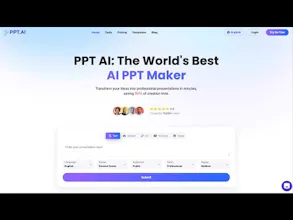
🚀 Turns messy notes into investor-ready decks in minutes
💎 Premium designs that make you look like a pro (no design skills needed)
⏳ Saves 95% time - that's 19hrs/week for most consultants!
The real questions:
1. What's your WORST PowerPoint horror story? (Mine: 3am before a big pitch, crying over slide transitions)
2. Would you secretly use this and take all the credit? (We won't tell)
3. What's more valuable - time saved or looking like a design genius?
Try it free today - your future self will thank you when you're not up at 2am fixing bullet points! #DeathToDeathByPowerPoint
Report
Congrats on the launch! Absolutely dread designing slides from scratch so love this! Also very nice that you offer multilingual support.
@ha_anh_nguyen Thanks a lot! We're so glad you like it! 🎉 Designing slides can definitely be a hassle, so we’re happy to make it easier. And yes, multilingual support was a must to make it accessible for everyone! Appreciate your feedback! 😊
@abandon_wu1 Thanks so much! We're really excited to make life easier for office workers like you. Saving time on PPTs means more time for other important tasks. Hope it helps boost your productivity! 😊
@kinkin Thank you so much! We're excited for you to try it out. We believe it can really streamline the process and save you a ton of time. Let us know what you think once you’ve given it a go! 😊
I spend a lot of time making a PPT, both at school and at work, and it sounds great to be able to just input my ideas and quickly generate a clearly structured, professionally designed presentation.
@yuki25 That’s exactly what we aim to do—help you save time while delivering high-quality presentations! It’s awesome to hear that it resonates with your needs at school and work. Hope it makes your life a lot easier! 😊 Let us know how it goes when you try it out!






PPT.AI
@rani_zagita Thank you! 🙌 We're so glad the smart structuring stood out — it's one of our favorite features too. Here's to saving those painful hours every week! Appreciate the support!
🔥 **"Death to Death by PowerPoint!"** 🔥
PPT.AI just automated the worst part of your job:
⚡ Cursor-like magic for slides – transform bullet points into stunning decks
🎨 Smart templates that actually look professional
⏳ 95% faster than fighting with PowerPoint’s garbage defaults
Real talk:
1. What’s your biggest PowerPoint pain? (Mine: wasting hours on formatting that no one notices…)
2. Would you trust AI to build your slides?(Or do you still micromanage every text box?)
3. Vote: Better design or faster creation – which would save you more sanity?
👇 Try it free & roast your old slides in the replies. #ByeByePowerPoint
🔥 "PowerPoint just got disrupted - and your boss will never know you used AI!" 🔥
Ranked #4 on Product Hunt for a reason:
🚀 Turns messy notes into investor-ready decks in minutes
💎 Premium designs that make you look like a pro (no design skills needed)
⏳ Saves 95% time - that's 19hrs/week for most consultants!
The real questions:
1. What's your WORST PowerPoint horror story? (Mine: 3am before a big pitch, crying over slide transitions)
2. Would you secretly use this and take all the credit? (We won't tell)
3. What's more valuable - time saved or looking like a design genius?
Try it free today - your future self will thank you when you're not up at 2am fixing bullet points! #DeathToDeathByPowerPoint
Congrats on the launch! Absolutely dread designing slides from scratch so love this! Also very nice that you offer multilingual support.
PPT.AI
@ha_anh_nguyen Thanks a lot! We're so glad you like it! 🎉 Designing slides can definitely be a hassle, so we’re happy to make it easier. And yes, multilingual support was a must to make it accessible for everyone! Appreciate your feedback! 😊
Pokecut
Sounds like a super cool AI tool that can save time making PPTs - truly a godsend for officer workers!
PPT.AI
@abandon_wu1 Thanks so much! We're really excited to make life easier for office workers like you. Saving time on PPTs means more time for other important tasks. Hope it helps boost your productivity! 😊
Pokecut
Congratulations on the launch of PPT.AI! Looking forward to trying it out and seeing how it can streamline the presentation process.
PPT.AI
@kinkin Thank you so much! We're excited for you to try it out. We believe it can really streamline the process and save you a ton of time. Let us know what you think once you’ve given it a go! 😊
Pokecut
I spend a lot of time making a PPT, both at school and at work, and it sounds great to be able to just input my ideas and quickly generate a clearly structured, professionally designed presentation.
PPT.AI
@yuki25 That’s exactly what we aim to do—help you save time while delivering high-quality presentations! It’s awesome to hear that it resonates with your needs at school and work. Hope it makes your life a lot easier! 😊 Let us know how it goes when you try it out!