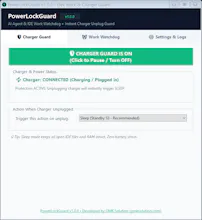
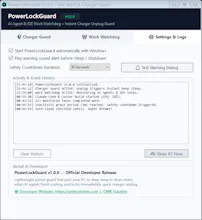
PowerLockGuard is an ultra-lightweight (~90 KB), 100% offline Windows utility for overnight AI coding agents (Claude Code, Aider, Python training). Work Watchdog: Monitors AI tasks, auto-kills stuck processes, and safely sleeps your PC when finished so it doesn't run all night. Charger Guard: Instantly deep-sleeps (S3 Standby) on power loss, freezing terminal states and memory in RAM before timeouts corrupt projects or burn expensive tokens.
Hey hunters š I'm Kamrussama, creator of PowerLockGuard.
I run autonomous AI coding agents (like Claude Code, Aider, and local model training) late into the night. But every single night, two problems kept haunting me:
1. The "Can't Sleep" Problem:
At midnight, your AI agent is running. You're dead tired, but you can't sleep because Windows won't shut down or sleep when the job finishes. If you sleep, the PC stays on all night at full blast wasting electricity. If you turn on Windows auto-sleep, a single hung background terminal prevents it from sleeping anyway.
So I built Work Watchdog: It monitors all AI agent processes in real-time, spots stuck zombie tasks, and when the workload genuinely completes past your safety buffer, it shows a 30s countdown and cleanly puts the PC to sleep. You just set it and go to bed!
2. Sudden Power Cuts:
When AC power drops, your home WiFi router dies immediately. If your AI agent is in the middle of generating code or waiting on an API, network timeout crashes the whole session ā wasting tokens and leaving messy half-written files.
So I built Charger Guard: The millisecond your charger unplugs or power fails, it forces Windows into S3 Deep Sleep in under 50ms. Everything stays frozen intact in RAM. When power returns, press power and resume right where you were.
Key Highlights:
ā” ~90 KB single file ā zero bloat
š 100% Offline ā zero telemetry, zero analytics, zero internet required
š Free & Open Source under MIT License
šŖ Available on Microsoft Store & GitHub
I'd love to hear your feedback, feature ideas, and bug reports! What AI agents or dev processes should we add next?