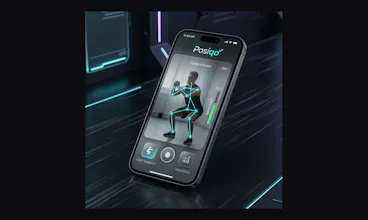
Posiqo is an AI-powered fitness coaching app that uses on-device pose detection to analyze exercise form in real time. It tracks 33 body landmarks at 30 frames per second, providing instant voice coaching cues like "Lower your hips!" or "Keep your back straight" — entirely on-device with zero data uploads. Posiqo supports 20+ exercises including squats, push-ups, lunges, and bicep curls, and offers automated rep counting, post-set per-rep form breakdowns, smart rest timers.
No reviews yetBe the first to leave a review for PosIQo
Maker
📌
Hi Product Hunt! 👋 I'm thrilled to introduce Posiqo today.
Why we built this: We noticed a massive gap in home fitness: you either pay a premium for a human personal trainer to watch your form, or you follow along with videos and hope you're doing it right (often risking injury). We wanted to make perfect form accessible, measurable, and highly addictive.
How it works: Posiqo uses on-device ML pose detection to analyze your movements in real-time. It doesn't just count reps; it evaluates your form, gives live voice coaching, and feeds all that data into your PQ Score (Pose Intelligence Quotient). Your PQ Score is a 0-1000 rating based on your form quality, consistency, progression, and workout diversity.
To keep you motivated, we leaned heavily into gamification:
Level up your avatar and earn XP.
Use coins in the "Armory" to unlock cyberpunk-themed apparel and visual auras.
Buy "Streak Shields" to protect your progress on rest days.
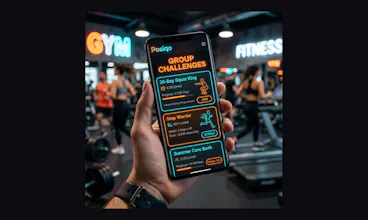
Compete with friends in social group challenges.
Everything runs beautifully with a dynamic "Stitch" cyberpunk-athletic design, and the AI processing happens entirely on your device for privacy and speed.
We have a free tier with 7 AI exercise sessions a month and unlimited running/walking tracking.
We would absolutely love your feedback!
How does the real-time tracking feel on your device?
What exercises would you like us to add next to the AI analyzer?
Let me know what you think in the comments! 👇
Report
How well does the on-device pose detection handle occlusion, like when my arm crosses in front of my torso during a bicep curl? Curious if the rep counting stays accurate in those cases.
Report
Maker
@ekin1365035 yes it works well . We have written a smoother
Report
Maker
@ekin1365035 Thanks for the great question! We actually handle this at three levels:
Confidence filtering — Every landmark from the pose model comes with a confidence score. If occlusion drops any joint below our threshold, we skip that frame entirely rather than guessing wrong.
Smoothed rep counting — We don't count reps off raw data. Progress is smoothed with an exponential moving average, so a few noisy frames during a momentary crossover won't trigger a false rep.
Form quality gating — Even after detecting a rep cycle, we check what percentage of frames during that rep had good tracking. If too many were occluded, the rep gets rejected instead of counted.
Pro tip: The app works best from a side angle for curls — this naturally minimizes arm-torso occlusion and gives the most accurate tracking. If you're facing the camera head-on and joints get blocked, Posiqo will prompt you to reposition rather than count bad reps. We'd rather miss a rep than count a wrong one! 💪
Report
how well does it actually handle tricky angles like a side view during lunges or does it really need a straight-on camera to keep tracking the landmarks right?
Report
Maker
@nurcandemi21842 we already have identified view is good per exercise and unless those joins are not visible it will not start. it advise user to use side-view or front view based on exercise type.
Report
Maker
@nurcandemi21842 Great question! For lunges, a side or diagonal angle is actually what the app prefers.
If you face the camera perfectly straight-on, your front knee blocks your hip and ankle (occlusion), making tracking harder. Turning to the side reveals all the critical joints.
To make this work seamlessly, we built the analyzer to map 3D movement onto a 2D plane:
Stance & Depth: We measure the true 2D hypotenuse (X and Y) between your joints and normalize it against your torso length, so it tracks accurately from any angle.
Smart Degradation: Some form checks (like "Knee Cave") require a front-facing view. If the math detects you are perfectly side-on, it safely disables just that one check without breaking your rep counting or depth tracking!
Report
How well does the on-device pose detection handle side angles or when part of the body goes out of frame, like during a deep squat?
Report
Maker
@evketha5i "Great question! This was one of our biggest challenges, but it handles both seamlessly.
Here’s the short of it:
Side Angles: Our tracking engine operates in 3D space, which allows it to dynamically figure out your orientation. Whether you're facing left, right, or center, it calculates your joint angles correctly without skipping a beat.
Out of Frame (Deep Squats): Every joint being tracked comes with a visibility score. If a critical joint (like your hips at the bottom of a deep squat) drops out of the camera's view, the app instantly pauses the analysis and gives you a real-time voice and visual alert ("User not visible. Center yourself.") so you can adjust your setup.
Plus, we use some built-in smoothing so that a split-second glitch or occlusion won't accidentally ruin your rep! Let me know if you want to chat more about it!"
Report
the on-device processing is a really thoughtful choice here, especially for something that records you mid-workout. love that the rep-by-rep breakdowns come after the set too, feels way more useful than trying to fix form in real time when you're already fatigued
Report
Maker
@kerim5oen "Thank you so much! Privacy was our #1 priority from day one—nobody wants their sweaty living room workouts uploaded to the cloud. Everything stays strictly on your device.
We're also huge fans of the post-workout breakdown! While the app does offer gentle real-time voice cues, we totally agree that diving into the rep-by-rep narrative after you've caught your breath is where the real learning happens. It’s exactly why we built the Pose Intelligence Quotient (PQ) system to track your form trends over time.
Appreciate the support!"
Report
Maker
Yes it works well. We have also written a smoother






How well does the on-device pose detection handle occlusion, like when my arm crosses in front of my torso during a bicep curl? Curious if the rep counting stays accurate in those cases.
@ekin1365035 Thanks for the great question! We actually handle this at three levels:
Confidence filtering — Every landmark from the pose model comes with a confidence score. If occlusion drops any joint below our threshold, we skip that frame entirely rather than guessing wrong.
Smoothed rep counting — We don't count reps off raw data. Progress is smoothed with an exponential moving average, so a few noisy frames during a momentary crossover won't trigger a false rep.
Form quality gating — Even after detecting a rep cycle, we check what percentage of frames during that rep had good tracking. If too many were occluded, the rep gets rejected instead of counted.
Pro tip: The app works best from a side angle for curls — this naturally minimizes arm-torso occlusion and gives the most accurate tracking. If you're facing the camera head-on and joints get blocked, Posiqo will prompt you to reposition rather than count bad reps. We'd rather miss a rep than count a wrong one! 💪
how well does it actually handle tricky angles like a side view during lunges or does it really need a straight-on camera to keep tracking the landmarks right?
@nurcandemi21842 we already have identified view is good per exercise and unless those joins are not visible it will not start. it advise user to use side-view or front view based on exercise type.
@nurcandemi21842 Great question! For lunges, a side or diagonal angle is actually what the app prefers.
If you face the camera perfectly straight-on, your front knee blocks your hip and ankle (occlusion), making tracking harder. Turning to the side reveals all the critical joints.
To make this work seamlessly, we built the analyzer to map 3D movement onto a 2D plane:
Stance & Depth: We measure the true 2D hypotenuse (X and Y) between your joints and normalize it against your torso length, so it tracks accurately from any angle.
Smart Degradation: Some form checks (like "Knee Cave") require a front-facing view. If the math detects you are perfectly side-on, it safely disables just that one check without breaking your rep counting or depth tracking!
How well does the on-device pose detection handle side angles or when part of the body goes out of frame, like during a deep squat?
@evketha5i "Great question! This was one of our biggest challenges, but it handles both seamlessly.
Here’s the short of it:
Side Angles: Our tracking engine operates in 3D space, which allows it to dynamically figure out your orientation. Whether you're facing left, right, or center, it calculates your joint angles correctly without skipping a beat.
Out of Frame (Deep Squats): Every joint being tracked comes with a visibility score. If a critical joint (like your hips at the bottom of a deep squat) drops out of the camera's view, the app instantly pauses the analysis and gives you a real-time voice and visual alert ("User not visible. Center yourself.") so you can adjust your setup.
Plus, we use some built-in smoothing so that a split-second glitch or occlusion won't accidentally ruin your rep! Let me know if you want to chat more about it!"
the on-device processing is a really thoughtful choice here, especially for something that records you mid-workout. love that the rep-by-rep breakdowns come after the set too, feels way more useful than trying to fix form in real time when you're already fatigued
@kerim5oen "Thank you so much! Privacy was our #1 priority from day one—nobody wants their sweaty living room workouts uploaded to the cloud. Everything stays strictly on your device.
We're also huge fans of the post-workout breakdown! While the app does offer gentle real-time voice cues, we totally agree that diving into the rep-by-rep narrative after you've caught your breath is where the real learning happens. It’s exactly why we built the Pose Intelligence Quotient (PQ) system to track your form trends over time.
Appreciate the support!"