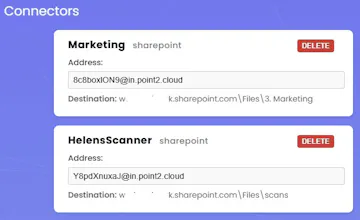
Our Email-to-SharePoint bridge enables the millions of legacy or simply lower-end scanners, printers, photocopiers and MFDs out there to scan documents directly and securely to SharePoint, without any of the complex setup of apps or automation flows.
No reviews yetBe the first to leave a review for Point2 Cloud
Maker
📌
Hey all. So, I'm an IT MSP by day, and a lot of our projects are migrations away from on-prem fileservers up to SharePoint.
Most of the time our customers have older printers & scanners, or printers & scanners that don't support SharePoint natively, and so we have to "break" their workflow by moving them to Scan-to-email instead where anything they scan gets emailed to them, instead of being deposited in a central "scans" folder, which can be a source of contention.
Point2 fixes this by enabling millions of devices that aren't SharePoint compatible to be able to scan to any SharePoint folder by acting as an email "bridge".
Users simply scan-to-email instead using a unique email address that we provide, and the document still appears in a folder on their computer, just like before, only now it's on SharePoint.
An added advantage is that this can be quickly deployed across any number of printers/scanners without having to set each one up with their own SharePoint integrations, and has the secondary advantage of being able to be used by literally any email application, from anywhere - things like scanning a legal document out on site by simply attaching photos to an email and firing it off to their unique address.
I built this initially just as something I could use for my customers to make their lives easier, but decided to brand it and build it as if it were a real world service, and that's what it's now become.
Keeping it super simple and super lightweight, with added support for DropBox and Google Drive coming soon.