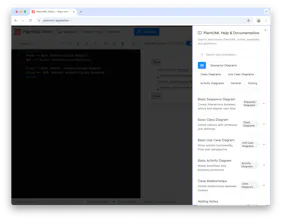
Professional web-based PlantUML editor with real-time preview, collaboration features, and export options. Create sequence, class, use case, and activity diagrams with syntax highlighting and auto-completion.
No reviews yetBe the first to leave a review for PlantUML Web Editor
Maker
📌
Why did you build this?
"We built this because creating and sharing UML diagrams shouldn't be complicated or expensive."
Most existing UML tools are either desktop-heavy, require expensive licenses, or lack real-time collaboration features. Developers and architects needed a modern, web-based solution that combines the power of PlantUML with the convenience of real-time editing, instant sharing, and professional presentation modes. We wanted to democratize diagram creation - making it accessible to everyone from solo developers to enterprise teams.
What's new and unique about your launch compared to alternatives?
Revolutionary Features That Set Us Apart:
Dual-Mode Sharing System: Unlike competitors, we offer both "Full Editor" links (recipients can edit code) and "Preview-Only" links (clean presentation mode) - perfect for different collaboration scenarios.
Advanced Import Capabilities: First PlantUML editor with native support for importing from encoded PlantUML URLs - copy any PlantUML link from anywhere and paste it directly into our editor.
Professional Viewing Modes:
Full-screen presentation mode for meetings
Distraction-free viewer mode
Embed-friendly preview system
Intelligent Editor Features:
Monaco-powered editor with PlantUML-specific autocomplete
Real-time syntax validation with detailed error messages
Code folding and advanced find/replace
Comprehensive Template Library: Pre-built professional templates covering all major diagram types (sequence, class, use case, activity, component, state, network, ER diagrams).
Version History & Collaboration: Built-in revision tracking with restore capabilities and permission-based sharing.
Zero-Setup Experience: Works instantly in any browser - no downloads, no installations, no account required for basic use.
What are you most proud of in this launch?
"We're most proud of solving the 'PlantUML URL encoding mystery' and creating the most user-friendly PlantUML experience available."
Technical Achievement: We cracked PlantUML's complex 3-step encoding algorithm (UTF-8 → Deflate → Custom Base64), enabling seamless import from any PlantUML source. This was a significant technical challenge that no other web editor had solved completely.
User Experience Innovation: We transformed a traditionally developer-only tool into something accessible to business analysts, product managers, and technical writers. The combination of our help panel, template library, and intuitive interface makes UML creation approachable for non-technical users.
Enterprise-Ready Features: Built authentication, collaboration, and sharing features that make this suitable for professional teams while keeping the core functionality free and accessible.
Community Impact: We've created a tool that bridges the gap between technical accuracy and visual presentation - developers can create precise diagrams while stakeholders can easily view and understand them.
Give us your feedback, comments & also share valuable feature requests if any!
A powerful web-based UML editor with real-time preview and collaboration—perfect for teams designing clear and professional diagrams. Love the syntax highlighting and export options. Congrats on the launch! 🚀📈
Linkinize
A powerful web-based UML editor with real-time preview and collaboration—perfect for teams designing clear and professional diagrams. Love the syntax highlighting and export options. Congrats on the launch! 🚀📈