pkgx

pkgx

the developer tool to run anything, anywhere

4.3
12 reviews

483 followers

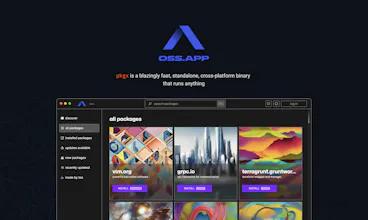
Introducing pkgx - a blazingly fast, standalone, cross‐platform binary that runs anything, anywhere. What’s better than a package manager? No package manager!
tea gallery image
tea gallery image
tea gallery image
tea gallery image
tea gallery image
tea gallery image
tea gallery image
Free
Launch Team
agent by Firecrawl
agent by Firecrawl
Gather structured data wherever it lives on the web
Promoted

What do you think? …

Max Howell
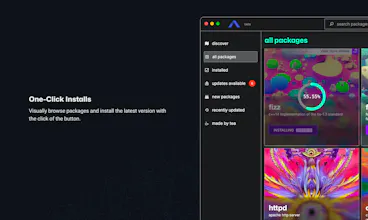
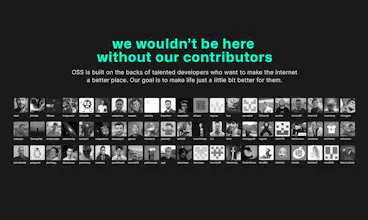
Hi Product Hunt! 14 years ago, I created Homebrew with the purpose of creating a tool that made it easier to develop and use software. It changed the way millions of developers work. Now, a decade and change later, I’m doing it again. I have always firmly believed that when building, tooling should get out of your way because you have much more important work to be doing. My first attempt with brew, solved the problem of installing dependencies. Now, with tea, you will never have to think about dependencies again. In November we released tea/cli, an invisible yet powerful package manager for fans of the terminal. Today we’re releasing its graphical complement. tea/gui is A FREE, OPEN SOURCE app that makes it easy for anyone to visually browse and manage hundreds of software packages. 👆 One-click installs. Instead of searching for install instructions in cluttered docs. You can install any software package (and the required dependencies) with ONE click. 🆕 Easy updates. Get notifications the moment a new update is available. 🔄 Version management. Take control of the exact package versions you want to install—without breaking any other installed packages. 🧩 Seamless integration. tea packages don’t install to your system, yet magically are there when you need them. tea also creates sandboxed, developer environments with only the packages your project needs without any virtualization overhead. 🔐 More secure. Don’t break your system with sudo; tea installs everything to your home directory. 🌐 Open source. We’re seasoned believers in open source to our very core with 60+ active contributors and growing. We also have aspirational goals to finally fix the open source funding problem. Once and for all. Stay tuned for that! 💪 Robust. Underneath is the powerful, fast and battle-tested tea/cli. We are excited to build a world where developers can focus on their work instead of wrangling with dependencies. And we’re excited to launch on PH and hear what you think of the product because we are only getting started and much more is yet to come! Please provide us feedback: Open source software’s first and only priority is always its community!
Marc Seitz
@mxcl it’s a pleasure to work on tea with you Max
Olga Zem
@mxcl Congratulations on the launch! I was initially drawn in by the name;) and was impressed by the concept. It's great to see a focus on making life easier for developers 👍. Best of luck with tea , and I look forward to seeing what's to come!
Marc Seitz
@mxcl @madzem Thank you for the support Olga 🤩
@mxcl, congrats on the launch! So simple but so good 🤝 I've been using Homebrew for years, so really looking forward to trying this out.
Chris Messina
This is awesome! I'm a longtime homebrew user — but love the idea of a faster, more secure replacement... especially one made by the creator of homebrew! I also appreciate the intention to find a way to support open source contributors just as the entire web lurches towards micropayments and remunerating the "plumbers and street sweepers" of the internet who thanklessly keep the place running.
Marc Seitz
@chrismessina Thanks Chris for hunting tea! The open source ecosystem deserves a better package manager 😉
Diogo Nunes
Is this a replacement for brew, or can both coexist? How does it compare to brew – is it just brew with a UI? When I use brew I don't think about dependencies, I just `brew install firefox`, so now I can click a button that says "Install Firefox"? I'm trying to understand what's the breakthrough here, because brew "it just works", so why fix it?
Yusuf Malikul Mulki
@diogonunes The big point I see is tea has an easy way to support open-source software/dependencies.
Marc Seitz
@diogonunes thanks for your question, Diogo. tea is sandboxed and doesn’t install anything in your /usr/local/bin by default. tea makes it a lot easier to install software. There are two products tea/cli and tea/gui. tea/cli is a command line interface as you’d expect it from a package manager, but it comes with magic, which detect which package you’re trying running and if it doesn’t exist, tea will intercept and fetch the package (and it’s dependencies) for you. tea/gui is the visual complement to tea/cli, which can also be used as a standalone app for non-developers who want to use open-source software like stable diffusion webUI, which is very complex to install. With tea, it’s just one click away. Brew is good at installing stuff. Not so good at updating, keeping track of dependencies, making your workflow easier. Your example is installing an app. However if you tried installing python with Homebrew it gets messy real quick.
Diogo Nunes
@mfts0 Thanks for the insightful reply! I installed Python with brew and yes it was messy, haha. There's just so much effort put into my current setup that I don't dare replacing brew but if/when I switch laptop I will surely give it a try! Keep it up
Marc Seitz
@diogonunes just staying open-minded - that’s all we ask for :) Do let me know when you get a chance to try it ;)
Max Howell
@diogonunes brew isn't broken, but it is stagnant. For a long time I've seen a lot of potential in package management. It is after all the base of the stack, isn't there so much more that can be done than just installing and updating packages? RN I'd say our main advantages are: • cross platform (mac/Linux already windows native coming soon, we aim to support even obscure platforms like your NAS or router) • developer environments, you can lock to specific versions of eg. python or node • we update rapidly and really care about package availability and reliability (we also do things like codesign all mac packages for your security and peace of mind) • we install to `~/.tea` and use “magic” to make tooling available to the tools you want without potentially messing up the rest of your system • we're super fast The gui is genuinely a complement to the cli. I see cli and gui as interfaces with different advantages and disadvantages. Currently the gui is super fun, but doesn't have a compelling advantage, but that will change quite soon we have some amazing things planned. One neat thing the gui already has is the “open” button, so open source projects like Stable Diffusion web UI (which nobody else even packages) feel like apps on our “app store”. I am already planning to package up way more of these kinds of things (eg https://github.com/nat/openplayg...) so that the gui can genuinely become a kind of app store for Open Source.
Tal Borenstein
Congratz on the launch folks! @mfts0 this is awesome!
Tom Smith
@mfts0 @talbo 🙏 🎉 🙌
Marc Seitz
@talbo Thanks for showing your support, Tal! Highly appreciated 🙌
Marc Seitz
I contributed to a lot of open source software, but tea is one of those rare projects that will last forever! Just like it's predecessor, Homebrew.
James Reynolds
I guess I'm an early tea adopter and I prefer it to anything else. There's something so refreshing to having the same software stack on my macOS and Linux computers. It's so much easier than Docker for many tasks. This is the first community project that I've felt really good contributing to. Max and the tea team have been very responsive and it has been such a pleasure working with them.
Marc Seitz
@james_reynolds6 James, your a rockstar 🥳 Thank you for supporting our launch and your contributions on tea/cli and the many packages you have contributed already 💪
Felix Magedanz
To me as an open source founder tea looks very promising. Congrats on the launch and keep up the good work 🙌
Tom Smith
@flxmgdnz Thanks so much Felix! Much appreciated! 🙏 🎉 🚀
123
•••
Next
Last