PixRGBCatch is the fastest way to capture and identify colors around you. Point your camera at anything β tap to grab a single pixel color, or long-press to get the average color of an area. Select a photo from your library and extract colors from any image.
No reviews yetBe the first to leave a review for PixRGBCatch
Maker
π
PixRGBCatch is the fastest way to capture and identify colors around you.
Point your camera at anything β tap to grab a single pixel color, or long-press to get the
average color of an area. Select a photo from your library and extract colors from any image.
The app instantly shows you the exact RGB, HEX, HSL, and CMYK values, along with the nearest
color name from a built-in library.
Create and manage color palettes, generate harmonious color schemes (complementary, analogous,
triadic, square), and save everything locally on your device. No account needed, no data
collected β all processing happens right on your phone.
FEATURES:
β’ Live camera color capture β tap for single pixel, long-press for area average
β’ Photo library support β extract colors from any image
β’ Dominant color extraction β find the top palette from any photo
β’ HEX, RGB, HSL, CMYK color values
β’ Color name lookup from 150+ named colors
β’ Color harmony generator
β’ Palette management with local storage
β’ Export support
β’ 100% private β no data leaves your device
Report
Would love to see a palette export option that saves the colors you grab as a named palette you can share or reopen later. Right now the colors feel one-off and it would be nice to build a library of palettes from different objects or photos over time.
Thank you so much for your feedback and for taking the time to share your ideas!
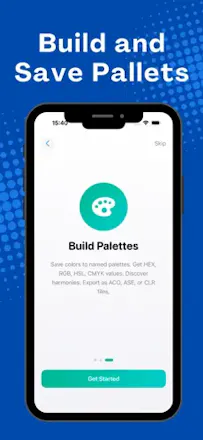
The ability to save, name, and revisit your color palettes is actually already a feature in the app. I have attached a few screenshots to show you exactly where to find it so you can start building your color library.
Would love to see a palette export option that saves the colors you grab as a named palette you can share or reopen later. Right now the colors feel one-off and it would be nice to build a library of palettes from different objects or photos over time.
@hikmetnder6n1mΒ
Thank you so much for your feedback and for taking the time to share your ideas!
The ability to save, name, and revisit your color palettes is actually already a feature in the app. I have attached a few screenshots to show you exactly where to find it so you can start building your color library.
Have a wonderful day!