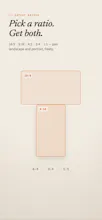
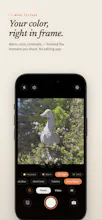
Shoot portrait and landscape at once — one shutter, two ratios, both saved. Pilm previews 35 film-inspired color presets live on the viewfinder, so the photo you see is the photo you get. Includes dual-ratio video and an editor for applying the same film looks to your existing photos.
No reviews yetBe the first to leave a review for Pilm Camera
Maker
📌
Hey Product Hunt! 👋 I'm Seyoung, the maker of Pilm.
What inspired this: Every time I pulled out my phone to capture a moment, I hit the same tiny dilemma — shoot vertical for stories and reels, or horizontal for YouTube and the archive? You pick one, and later you always wish you had the other.
So Pilm shoots both at once. The live preview splits into two frames (landscape on top, portrait below), you press the shutter once, and both ratios are saved as separate photos. Same for video.
The second problem I wanted to solve: filters that come after the shot. I wanted the film look to be part of framing, not post-processing. Pilm renders 35 film-inspired presets live on the preview with Metal, so what you see through the viewfinder is the photo you get.
How the process evolved: honestly, by removing things. Early versions had manual ISO/shutter controls — I cut them after realizing nobody (including me) actually used them on a phone. Instead I doubled down on what a phone camera should be: one-handed, instant, opinionated color. Along the way, I added a lightweight editor for applying the same film looks to photos already in your library, 24/48MP options, and a first-launch tour that points at where things actually are instead of a slideshow.
I'd love to hear what you think — especially which ratio combos and film stocks you'd want next. I'll be around all day answering questions! 🎞️