
PicSeal
Seal and restore sensitive content in editable documents
10 followers
Seal and restore sensitive content in editable documents
10 followers
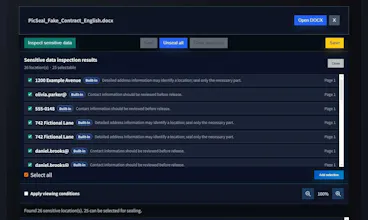
PicSeal lets you seal only the sensitive text and images inside PDF, DOCX, and HWP/HWPX files without converting editable documents to PDF. Public content stays visible, while authorized users can unseal and restore the original content for further editing. COXSI document classification and security policies improve sensitive-content detection. Access conditions, audit records, Google Drive integration, and PicSeal Reader support secure distribution.



Free Options
Launch Team

CloudflareDeploy serverless functions globally in seconds
Promoted
It would be really helpful if PicSeal could batch-process multiple files at once with the same sealing policy applied across all of them. Right now it seems like you'd have to handle each document individually, which gets tedious for teams dealing with large sets of contracts or reports. Adding a folder-level batch option would save a ton of time.
@deployfriday
Thank you. That is a good suggestion.
PicSeal already has a feature for enterprise use that automates document inspection via scheduling, specifically for the cloud. However, the final approval process for OAuth authorization from cloud providers is lengthy and extremely stringent. Therefore, it has been put on hold.
Currently, simultaneous processing of multiple files (e.g., folder selection) is provided only within a restricted security zone for enterprise use. This is because most companies prefer an "on-premises" format.
We will review and release it for personal use, albeit on a limited basis.
@deployfriday
PicSeal WorkBench is now available, allowing you to select files or folders for sealing or unsealing and track the process and results for up to 20 files at once. Files and inspection results are retained only in the current browser tab and disappear when the page is refreshed or the tab is closed. Files passed to an individual work screen are removed from temporary browser storage after they are read once.
The ability to seal just the sensitive bits inside DOCX and HWP files without flattening the whole document is a thoughtful move. It keeps the editing workflow intact for the right people instead of forcing a clunky PDF conversion loop.
@zora_masefield Thank you — you captured exactly what we were trying to solve.
We wanted users to protect only the sensitive parts while keeping the original DOCX or HWP editing workflow intact for authorized users. I really appreciate you noticing that distinction.
Here is another practical way PicSeal can be used.
A company event photobook or promotional document can be distributed in PDF, DOCX, HWP, or HWPX format while selected photos, text, or other content remain sealed.
In this demo, the protected content can be opened only once and viewed for 10 seconds. After that, it is no longer available under the same access condition.
This type of controlled distribution can also be used for event photos, digital magazines, premium reports, promotional content, internal documents, and subscriber-only materials.
Demo:
https://youtu.be/TxUwjAIL5uA
PicSeal is not limited to text documents.
It can also protect image content, allow controlled release, and support audit and tracking after distribution.
This makes it possible to share images while still controlling who can access the protected parts and reviewing what happened afterward.
In this demo, you can see image sealing, release, audit, and tracking in one workflow.
Demo:
https://youtu.be/RmmAe6Qp3W4
Not every document-sharing workflow needs user registration or group setup.
With PicSeal, a document can be protected with an access code and distributed immediately. The recipient only needs the code to open the sealed content.
Saving can also be disabled, allowing the recipient to view the protected content inside PicSeal Reader without saving the released file.
This is useful for quickly sharing confidential documents, customer materials, event content, training documents, or temporary project files.
Demo:
https://youtu.be/5kpNxVZTPek