No reviews yetBe the first to leave a review for Free PDF Form Filler & Signature Tool
Maker
📌
Hi everyone!
I built PDFlastica because I wanted a simple way to sign PDF files on Windows without uploading documents to an online service.
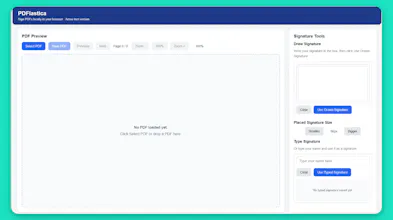
PDFlastica lets you add either a typed or a drawn signature, move it into place, resize it, and save the signed PDF. Everything works offline, so your files stay on your own computer.
I'd love to hear your feedback! Is there a feature you'd like to see in a future version, or what do you look for most in a PDF signing tool?
Thanks for checking it out, and I hope you find it useful!
Report
Does this handle multi-page PDFs where you need different signatures on different pages, or is it one signature applied to the whole document?
Report
Maker
@faruk1723009 Right now, PDFlastica adds one signature at a time. If you need signatures on different pages, you can save the PDF after adding the first signature, then upload the saved PDF again and add another signature to another page.
Report
Love that it runs fully offline, no uploading sensitive contracts to some random server just to sign them. The drag-to-resize signature workflow sounds way less clunky than the Acrobat one I keep avoiding.
Report
Maker
@glhanaydnerudc Thank you so much! That means a lot. I wanted PDFlastica to make signing PDFs as simple and straightforward as possible. The drag-to-resize signature workflow was designed to reduce the extra steps, so I'm really happy it stood out. Thanks for taking the time to share your thoughts!
Report
Does it handle batch signing for multiple PDFs at once, or do you have to open and sign each one separately?
Report
Maker
@erdemzdzmxx3 At the moment, you sign one PDF at a time. This keeps the interface simple and lets you place each signature exactly where you want it on the page. If enough users need batch signing in the future, I'll definitely consider adding it.
Report
Maker
@erdemzdzmxx3 Thanks for asking! Currently, PDFlastica is designed for signing one PDF at a time. You simply open a PDF, add your text and handwritten signatures, then save the completed document. The focus is on keeping the app simple, lightweight, and easy to use. Batch signing isn't supported at the moment, but it's something I may consider for a future update if there's enough interest.
Report
Does it handle multi-page PDFs, or do I have to sign each page one at a time?
Report
Maker
@hiranursargan Yes, PDFlastica supports multi-page PDFs. You can navigate between pages and place signatures wherever you need. If multiple pages require signatures, you'll add them one page at a time so you can position each one accurately.
Report
Maker
@hiranursargan Thanks for the question! PDFlastica fully supports multi-page PDFs. You can navigate through the pages, add text or handwritten signatures wherever needed, and save the completed document. Each text item or signature is placed individually, giving you full control over every page.
Does this handle multi-page PDFs where you need different signatures on different pages, or is it one signature applied to the whole document?
@faruk1723009 Right now, PDFlastica adds one signature at a time. If you need signatures on different pages, you can save the PDF after adding the first signature, then upload the saved PDF again and add another signature to another page.
Love that it runs fully offline, no uploading sensitive contracts to some random server just to sign them. The drag-to-resize signature workflow sounds way less clunky than the Acrobat one I keep avoiding.
@glhanaydnerudc Thank you so much! That means a lot. I wanted PDFlastica to make signing PDFs as simple and straightforward as possible. The drag-to-resize signature workflow was designed to reduce the extra steps, so I'm really happy it stood out. Thanks for taking the time to share your thoughts!
Does it handle batch signing for multiple PDFs at once, or do you have to open and sign each one separately?
@erdemzdzmxx3 At the moment, you sign one PDF at a time. This keeps the interface simple and lets you place each signature exactly where you want it on the page. If enough users need batch signing in the future, I'll definitely consider adding it.
@erdemzdzmxx3 Thanks for asking! Currently, PDFlastica is designed for signing one PDF at a time. You simply open a PDF, add your text and handwritten signatures, then save the completed document. The focus is on keeping the app simple, lightweight, and easy to use. Batch signing isn't supported at the moment, but it's something I may consider for a future update if there's enough interest.
Does it handle multi-page PDFs, or do I have to sign each page one at a time?
@hiranursargan Yes, PDFlastica supports multi-page PDFs. You can navigate between pages and place signatures wherever you need. If multiple pages require signatures, you'll add them one page at a time so you can position each one accurately.
@hiranursargan Thanks for the question! PDFlastica fully supports multi-page PDFs. You can navigate through the pages, add text or handwritten signatures wherever needed, and save the completed document. Each text item or signature is placed individually, giving you full control over every page.