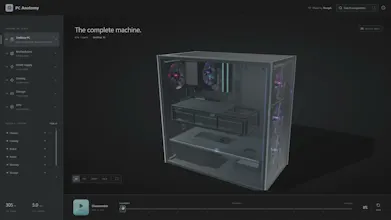
PC Anatomy is an open source interactive 3D explorer for computer hardware. Take apart a desktop PC, inspect its components, and dive deeper from the motherboard, CPU, cooling, storage and GPU all the way down to GPU architecture and individual streaming multiprocessors. Every component includes explanations, specifications and sources, with all 3D geometry generated directly in TypeScript and Three.js.
Astra pushed the project way further than I originally expected or thought was possible. One of the coolest parts was using it with reference images of real PC components. I could show it a GPU, cooler, motherboard, or other part, and it helped break down the shape, proportions, layout, and small visual details so I could recreate it in Three.js.
That made it possible to build models that looked really close to the real hardware, sometimes almost 1:1 visually, while still keeping everything generated directly in TypeScript instead of importing ready-made 3D models.
It also helped a lot with the actual Three.js work, like positioning parts, structuring scenes, animations, interactions, and refining the overall look. Because of that, PC Anatomy grew from a simple 3D PC viewer into something much more detailed where you can keep diving deeper into the hardware.
I built PC Anatomy because I wanted a more visual way to understand computer hardware.
Most resources either explain components through text and diagrams or show you how to assemble a PC. I wanted something where you could actually explore the machine, take it apart, click components, and keep going deeper into how they work.
What started as a 3D desktop PC explorer has grown into multiple levels of detail. You can go from the complete PC into the RTX 5090, then into the GB202 processor, GPCs, TPCs and individual streaming multiprocessors.
The project is open source and built with TypeScript, React and Three.js. The geometry is generated in code rather than using imported 3D models.
AI workflows were also used as a development tool throughout the project for coding, iteration, debugging and documentation.
PC Anatomy
PC Anatomy