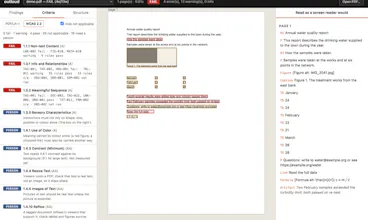
Checks whether a PDF actually works with a screen reader. Runs on Mac, Windows and Linux, nothing leaves your computer. Marks every problem on the page and tells you the fix. Open source, Apache 2.0.
Hi Product Hunt, I'm Yash.
I do PDF accessibility work: making documents readable for people who use screen readers. The standard checker, PAC, only runs on Windows. The other one, veraPDF, needs Java and was built for compliance labs. On a Mac there was nothing, and in a CI pipeline there was nothing.
So I built outloud. It runs anywhere, and you can drop a PDF into a page in your browser and see every problem outlined on the page itself, next to what a screen reader would actually read out.
The part I'm proudest of: it checks things the standard tools can't. They test that an image has alt text. They can't tell you the alt text is "IMG_2041.jpg". They test that a table has header cells. They can't tell you the headers are empty. Our own published report passed veraPDF, and a screen reader read its appendix table as silence. outloud caught it.
What it does:
• PDF/UA and WCAG 2.2 checks, calibrated to agree with veraPDF on all 160 files we tested
• 35 extra checks on whether the tags match what's on the page
• Every WCAG criterion marked pass, fail, not applicable or "needs a person"
• A one-line fix on every finding
• Terminal, JSON, SARIF for GitHub code scanning, HTML, and a local app
Free and open source. pipx install outloud, or grab it from GitHub.
Honest limits: no colour contrast check yet, PDF/UA-1 only, and the semantic checks are heuristics that will sometimes be wrong. If it gets something wrong on your file, that's the most useful thing you could tell me.
LitGrades