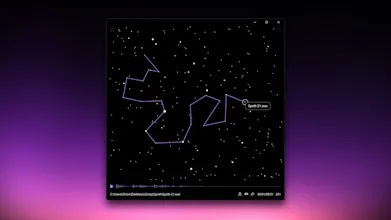
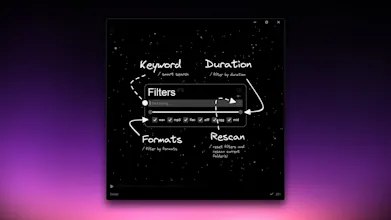
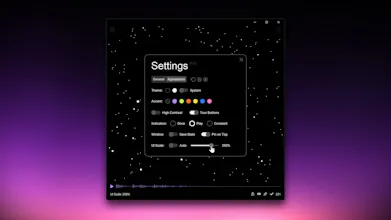
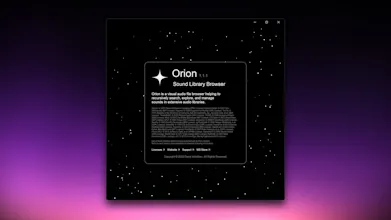
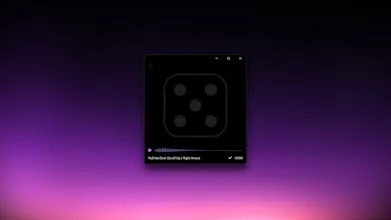
Orion is a visual audio file browser helping to recursively search, explore, and manage sounds in extensive audio libraries. It redefines local audio file browsing, making it easier than ever to discover and preview your sounds.
Vy - Cross platform AI agent — AI agent that uses your computer, cross platform, no APIs
AI agent that uses your computer, cross platform, no APIs
Promoted
Maker
📌
I’m excited to share a passion project I’ve been working on recently — my very first standalone app written in Python, developed in my free time between projects.
After struggling to find a convenient audio file browser for working with my sound effects library, I decided to build one myself. Introducing Orion — a visual audio file browser helping to recursively search, explore, preview, and manage sounds in extensive audio libraries.
Coming from a design background rather than programming, I began this project with only a basic knowledge of Python. Over six months of learning and development, I was able to bring the app to life.
The goal was to create something both functional and visually appealing. This has been a true solo effort — I handled the design, coding, testing and optimization myself. Of course, I made use of some amazing open-source libraries that helped speed up development. I also dipped into UX/UI design and ended up really enjoying the process.
It’s been an incredibly rewarding experience that pushed my skills to a new level. It is just the MVP release, so not all the features I envisioned are in place yet — but I plan to continue development if the app gains traction.
To celebrate the launch, the full version is free for the first 100 users with this special promo code:
Creating a full desktop app in Python all by yourself is no easy task. Major kudos to you!
Report
Maker
@henry_turner2 Thanks a lot! It was a big challenge and took a lot of late nights, but seeing it work made it all worth it.
Report
The way you approach visual browsing is genius. A lot of audio tools feel outdated, but this one is a breath of fresh air.
Report
Maker
@erica_johnson4 Thank you so much! Making browsing more visual and intuitive has been the core idea since the start. I wanted to move away from the typical list-based approach and instead create something that feels natural, engaging, and even a little fun to use.
Report
As someone who has way too many sound effects crammed into folders, this is exactly what I’ve been looking for.
Report
Maker
@gregory_dower I totally get it! Browsing sounds through endless subfolders can be a nightmare, so I wanted to make the process more fun and enjoyable.
Report
Your honesty about your learning journey is truly inspiring. It really highlights what can be achieved with persistence.
Report
Maker
@lexi_bethan I really appreciate that! A lot of late nights and trial-and-error, but I’ve learned so much along the way, and in the end, persistence wins.
Report
It’s so inspiring to see someone jump into Python without a development background and create something tangible.
Report
Maker
@yuri_toledo1 Thank you! I really appreciate that. It’s been a steep learning curve, but seeing it live and working has made all the late nights and trial-and-error absolutely worth it.
Report
Sound designers are going to be thrilled with this. Even hobbyists will finally get a handle on their chaotic libraries.
Report
Maker
@niko_olimana Thanks! That’s exactly what I was hoping for — providing a way for them to browse any cluttered sound library with ease.
Have a question about Orion? Ask it here and get a real answer.
Do you use Orion?
Maker Comment
Maker
📌
I’m excited to share a passion project I’ve been working on recently — my very first standalone app written in Python, developed in my free time between projects.
After struggling to find a convenient audio file browser for working with my sound effects library, I decided to build one myself. Introducing Orion — a visual audio file browser helping to recursively search, explore, preview, and manage sounds in extensive audio libraries.
Coming from a design background rather than programming, I began this project with only a basic knowledge of Python. Over six months of learning and development, I was able to bring the app to life.
The goal was to create something both functional and visually appealing. This has been a true solo effort — I handled the design, coding, testing and optimization myself. Of course, I made use of some amazing open-source libraries that helped speed up development. I also dipped into UX/UI design and ended up really enjoying the process.
It’s been an incredibly rewarding experience that pushed my skills to a new level. It is just the MVP release, so not all the features I envisioned are in place yet — but I plan to continue development if the app gains traction.
To celebrate the launch, the full version is free for the first 100 users with this special promo code:
I’m excited to share a passion project I’ve been working on recently — my very first standalone app written in Python, developed in my free time between projects.
After struggling to find a convenient audio file browser for working with my sound effects library, I decided to build one myself. Introducing Orion — a visual audio file browser helping to recursively search, explore, preview, and manage sounds in extensive audio libraries.
Coming from a design background rather than programming, I began this project with only a basic knowledge of Python. Over six months of learning and development, I was able to bring the app to life.
The goal was to create something both functional and visually appealing. This has been a true solo effort — I handled the design, coding, testing and optimization myself. Of course, I made use of some amazing open-source libraries that helped speed up development. I also dipped into UX/UI design and ended up really enjoying the process.
It’s been an incredibly rewarding experience that pushed my skills to a new level. It is just the MVP release, so not all the features I envisioned are in place yet — but I plan to continue development if the app gains traction.
To celebrate the launch, the full version is free for the first 100 users with this special promo code:
Redeem the code at your Microsoft Account 🡥 or use the direct link 🡥
The app is currently available for Windows 10/11 only.
A Microsoft Account is required to get the app.
Don't have one? Sign up here 🡥
I hope you find it useful and enjoyable too!
Creating a full desktop app in Python all by yourself is no easy task. Major kudos to you!
@henry_turner2 Thanks a lot! It was a big challenge and took a lot of late nights, but seeing it work made it all worth it.
The way you approach visual browsing is genius. A lot of audio tools feel outdated, but this one is a breath of fresh air.
@erica_johnson4 Thank you so much! Making browsing more visual and intuitive has been the core idea since the start. I wanted to move away from the typical list-based approach and instead create something that feels natural, engaging, and even a little fun to use.
As someone who has way too many sound effects crammed into folders, this is exactly what I’ve been looking for.
@gregory_dower I totally get it! Browsing sounds through endless subfolders can be a nightmare, so I wanted to make the process more fun and enjoyable.
Your honesty about your learning journey is truly inspiring. It really highlights what can be achieved with persistence.
@lexi_bethan I really appreciate that! A lot of late nights and trial-and-error, but I’ve learned so much along the way, and in the end, persistence wins.
It’s so inspiring to see someone jump into Python without a development background and create something tangible.
@yuri_toledo1 Thank you! I really appreciate that. It’s been a steep learning curve, but seeing it live and working has made all the late nights and trial-and-error absolutely worth it.
Sound designers are going to be thrilled with this. Even hobbyists will finally get a handle on their chaotic libraries.
@niko_olimana Thanks! That’s exactly what I was hoping for — providing a way for them to browse any cluttered sound library with ease.