
Only Five
A menu bar to-do app that caps you at 5 tasks
17 followers
A menu bar to-do app that caps you at 5 tasks
17 followers
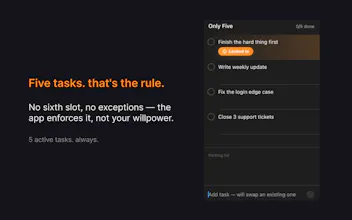
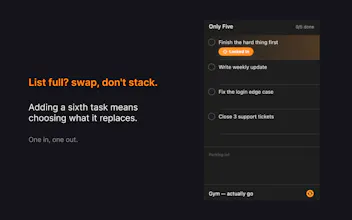
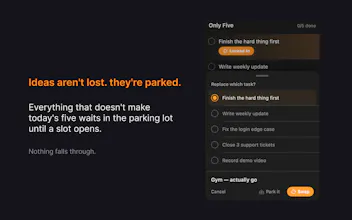
Only Five is a macOS menu bar to-do app with one rule: only 5 active tasks, ever. When your list is full, you swap a task out instead of piling more on — so you're always forced to prioritize instead of hoarding a 40-item backlog. Park stray ideas in a scratch note, focus on one task at a time, and build momentum with streaks and board-clear stats. Completed tasks auto-clear after 24 hours, so you start each day light. No dashboards, no clutter — just five things, done.

the hard cap is the right kind of constraint, most productivity apps let you cheat past the limit and the limit becomes decorative. genuine question about the parking lot though - isn't that just the 60-item graveyard with a different name? if it's a single scratch note with no structure, that's fine, but if it grows into its own list-within-a-list, people will just shove everything there the moment the 5 slots feel restrictive and you're back to square one, just one screen away. is there anything that keeps the parking lot itself from becoming the backlog, like a size limit or an expiry, or is that intentionally left as an unmanaged dumping ground on purpose?
@galdayan it's one I thought about a lot during design.
The parking lot is intentionally a single unstructured text field, not a second list. No checkboxes, no items, no count. Just free-form text you can jot into. Think of it more like a sticky note on your desk than a backlog queue.
There's no expiry or size limit currently - that's a deliberate choice. The moment I add structure (item counts, due dates, auto-promote features), it becomes the shadow backlog you're describing. The lack of structure is the friction. It's annoying enough to dig through a wall of text that people naturally keep it minimal or clean it out.
That said - your question is making me consider whether a gentle nudge might help. Something like a faint "last edited 2 weeks ago" timestamp that quietly signals when the parking lot is becoming stale. No enforcement, just awareness.
Appreciate you pushing on this - it's exactly the kind of design tension that's easy to get wrong. 🤝
@_elmahdim the timestamp nudge is the right instinct - it tells you the truth without enforcing anything, which matches the rest of the app's philosophy. adding a limit or expiry would just be reintroducing the thing you built the 5-slot cap to escape from, one level removed. staying unstructured on purpose is a better answer than I expected going in.
The focus-on-one-task-at-a-time idea is great, but I'd love a simple way to pin one of the five as the "must do today" so the swap mechanic feels less like a lateral move and more like real prioritization. Maybe a star next to slots that affects the stats weighting too.
@lirirowwin62437 Yes! This is already in there - called "Lock In."
When you mark a task as your focus, it shows up right in the menu bar next to your progress count. So even when the app is closed, that one task is staring at you. Exactly the "this is the one" nudge you're describing.
No stats weighting yet though - that's an interesting idea. 🤝
How does it handle the 24-hour auto-clear if someone wants to keep a record of stuff they finished for reference later?
@pfeliciadicvjqn right now it doesn't - completed tasks clear after 24 hours with no archive.
The app is focused on one thing: keeping you locked in on what matters right now.
An optional completion history is something I'd consider down the road if there's enough demand for it. 🤝
The five-task limit sounds restrictive but it actually cleared my head after a day of testing. Love that completed items vanish on their own.
@utkuwjto really glad it clicked. That "cleared my head" moment is exactly what I was going for. 🤝
Curious how the streak system treats a day where I finish all 5 by noon — does swapping in a new task still keep the streak alive, or does it only count the original set?