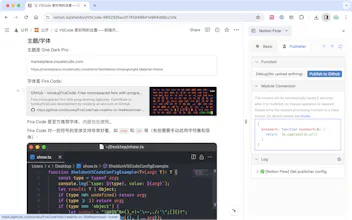
When you use Github for blogging, you might find it quite inconvenient. Not only do you have to write on a desktop, but you also have to handle images, Markdown syntax, and other issues. Notion, on the other hand, allows you to write comfortably anytime, anywhere, without worrying about these tedious tasks. That's why I built the Notion Flow browser extension. It lets you create content in Notion on the go and then publish it to Github in Markdown format or any custom format you prefer.
Looking ahead, there are two key features planned for the product. First, Notion Flow will incorporate OpenAI API to enable AI-powered writing assistance, including expanding on selected text, summarizing, and replacing content.
Secondly, the plugin feature will allow you to be more involved in the 'flow' of your Notion content. This includes customizing OSS providers and publishing your Notion pages to any platform that supports APIs.
Got more suggestions? All comments are welcome!
This also can be potentially handy to improve the workflow between tech / non-tech team members. My team constantly switches between Notion and GitHub, and sometimes what belongs where is a matter of debate. By chance, have you thought of automating tasks on Notion's Kanban board to be published on GitHub?
@eltairovy If by automation you mean automatically sending content to Github whenever a kanban is updated, I currently have no plans for that.
The main reason for this is due to the limitations of the Notion API. To my knowledge, the Notion API does not provide polling interfaces or proactive notification hooks, so ultimately, you would still need to manually publish the content to Github.
Additionally, if you're using kanban, you could also use a database, because in Notion, the two can be converted into each other—kanban and database are just different views.
Thank you for your suggestion!
@cwbuilds1 This plugin is used to send content from Notion to Github. If you use Github, I will assume that you are a technical person.
If you are a non-technical person and want to use Notion Flow, you may face some difficulties, but don't worry, Notion Flow's official documentation is very detailed and tells you how to configure Notion Flow.
However, I still need to mention that Github is for technical users, and you may need to understand first how to create a repository on Github. In addition, for non-technical users, image handling is the biggest difficulty because it requires setting up some things on OSS services, involving some concepts that you may not completely understand on your own.
Therefore, if you still want to use Notion Flow and want to publish images to Github, my suggestion is to use other image uploading services. After obtaining the image URL (for example: some_img_service.com/xxx.png), write the Markdown format text directly in Notion, like: [Img](some_img_service.com/xxx.png). After sending this to Github, the image link can be used to display the picture. However, this means you won't be able to view the image in Notion itself, so while this method works, it's not perfect.
Thanks for following!
Report
Exciting features! This browser extension empowers Notion users with a seamless TOC view, static blog publishing, OpenAI integration, and more.
Amazing 🌟
Notion Flow
Notion Flow
Macula
Notion Flow
PrettyPolly
Notion Flow