
Notewarp
Turn messy thoughts into clear, reusable notes with AI
17 followers
Turn messy thoughts into clear, reusable notes with AI
17 followers
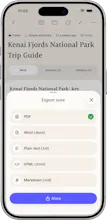
Notewarp turns messy captures into clear, reusable notes. Record a voice note, upload audio, paste text, add a file, scan text, or save a link. It keeps the original transcript beside the cleaned note, then reshapes the same source into summaries, action items, emails, study notes, outlines, and custom writing styles. Organise everything with tags, folders, search, and pinned notes; export it or share a polished public page. Available on the web, iPhone, iPad, and Mac.




Free Options
Launch Team

LightfieldAI-native CRM that builds itself and does work for you
Promoted

 Allister