Launching today

NotchDock
A teleprompter under your camera, plus a notch file shelf
1 follower
A teleprompter under your camera, plus a notch file shelf
1 follower
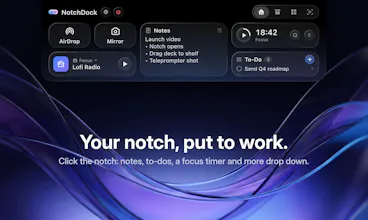
Click your MacBook notch to open a small panel: a shelf to park files, a teleprompter that scrolls right under the camera, notes, to-dos, a Pomodoro timer and quick widgets. Native, 19 languages, works on Macs without a notch too. Pay once, use on 3 Macs.




Payment Required
Launch Team

Atlassian LoomTalk it through in Loom. Ship with AI
Promoted
Hey Product Hunt! I'm Özgür, a solo Mac and iOS developer.
NotchDock turns the MacBook notch into a small drop-down panel. Click it, or drag a file onto it, and you get a drop shelf to park files, a teleprompter that scrolls your script right under the camera, notes, to-dos, a Pomodoro timer with focus radio, and quick widgets (currency converter, link shortener, holidays, app shortcuts).
The shelf keeps its own copy, so your originals stay untouched. The teleprompter keeps your eyes near the lens on calls and recordings, and mirror mode works with teleprompter glass.
Why I built it: on calls I was reading notes from a side window and never looking at the camera, and my desktop kept filling up with files I needed "for five minutes". The notch sits right next to the camera doing nothing, so I put a panel there.
It's native Swift, in 19 languages, and Macs without a notch get a virtual one. One-time purchase, up to 3 Macs, no subscription.
One question I'd really like your take on: which tab would you actually use every day, and what's missing?