Nook is a home-inventory app I started after a trip and a move. Add the places you use at home, save what you put in them, and keep the original place when something is taken out. The first 30 saved items are free; Full Version is US $2.99 once.
No reviews yetBe the first to leave a review for Nook: Home Inventory
Maker
📌
Hi Product Hunt — I’m Guoqing, and I made Nook.
A while ago, I came back from a trip and then moved. I had packed everything away, but a few days later I was already opening boxes and drawers trying to remember where I had put things. That was where Nook started.
There are already some very good home inventory apps. I didn’t build Nook because I thought they were doing it wrong. I just wanted the everyday part to feel quicker: put something away, save where it is, find it again, take it out, and remember to put it back.
In Nook, I add the places that already exist in my home — a room, cabinet, drawer, box, shelf, or bag — and then save the things inside them. If I’m putting away several things at once, I can keep taking photos instead of stopping to complete a long form after every picture. Nook can also try to read visible text in a photo to help with the name. That happens on the device, and the result naturally depends on the device, the photo, and how clear the text is.
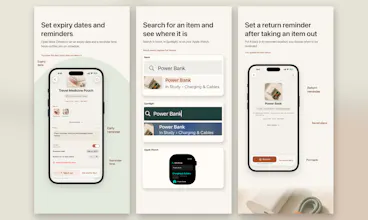
Once an item is saved, I can search for it in Nook. Eligible items can also appear in iOS Spotlight after indexing, so I don’t always have to open the app first.
When I take something out, I can mark it as out and ask Nook to remind me to put it back later. If I haven’t decided where something belongs yet, I leave it in Pile instead of making up a location just to finish the process. I can add expiration dates and reminders too — for food, medicine, documents, warranties, or anything else I don’t want to forget.
I also made a simple checklist. It can hold normal text, or I can add an item I already saved in Nook. It is there to support the inventory, not to turn Nook into another full task manager. The Apple Watch app is for quick lookup when my phone isn’t in my hand.
The part I cared about most was keeping optional detail quiet. Notes, reminders, dates, and extra controls are there when I need them, but they don’t have to fill every screen. I wanted this to feel like a small practical tool, not a database I had to maintain.
The first 30 saved items are free. Full Version is a one-time US $2.99 purchase for unlimited items and Apple Watch access. There is no subscription and no advertising.
I’m still making Nook by myself, and I know some choices will need improving once more people use it in real homes. If you try it, I’d genuinely like to hear what feels easy, what feels confusing, and what gets in your way. I’ll keep reading the feedback and working on it.



Hi Product Hunt — I’m Guoqing, and I made Nook.
A while ago, I came back from a trip and then moved. I had packed everything away, but a few days later I was already opening boxes and drawers trying to remember where I had put things. That was where Nook started.
There are already some very good home inventory apps. I didn’t build Nook because I thought they were doing it wrong. I just wanted the everyday part to feel quicker: put something away, save where it is, find it again, take it out, and remember to put it back.
In Nook, I add the places that already exist in my home — a room, cabinet, drawer, box, shelf, or bag — and then save the things inside them. If I’m putting away several things at once, I can keep taking photos instead of stopping to complete a long form after every picture. Nook can also try to read visible text in a photo to help with the name. That happens on the device, and the result naturally depends on the device, the photo, and how clear the text is.
Once an item is saved, I can search for it in Nook. Eligible items can also appear in iOS Spotlight after indexing, so I don’t always have to open the app first.
When I take something out, I can mark it as out and ask Nook to remind me to put it back later. If I haven’t decided where something belongs yet, I leave it in Pile instead of making up a location just to finish the process. I can add expiration dates and reminders too — for food, medicine, documents, warranties, or anything else I don’t want to forget.
I also made a simple checklist. It can hold normal text, or I can add an item I already saved in Nook. It is there to support the inventory, not to turn Nook into another full task manager. The Apple Watch app is for quick lookup when my phone isn’t in my hand.
The part I cared about most was keeping optional detail quiet. Notes, reminders, dates, and extra controls are there when I need them, but they don’t have to fill every screen. I wanted this to feel like a small practical tool, not a database I had to maintain.
The first 30 saved items are free. Full Version is a one-time US $2.99 purchase for unlimited items and Apple Watch access. There is no subscription and no advertising.
I’m still making Nook by myself, and I know some choices will need improving once more people use it in real homes. If you try it, I’d genuinely like to hear what feels easy, what feels confusing, and what gets in your way. I’ll keep reading the feedback and working on it.
— Guoqing