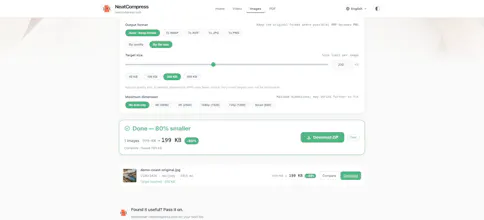
Compress videos, images and PDFs locally in your browser. Set target file sizes, batch-convert images, compare details with a 2× magnifier, trim and merge videos, extract audio, or create GIFs. Free to use, no signup or installation. Your files stay on your device; processing speed depends on your hardware and browser.
Hi Product Hunt! I'm the maker of NeatCompress.
I built it for a small but recurring problem: you need to make a file smaller, but first you have to upload a large video, wait for processing, and download it again. For personal photos or work documents, I also wanted an option that keeps the file on my own device.
NeatCompress processes videos, images and PDFs locally in your browser, with no account or installation required. A few things you can do:
• Aim for a target size in MB for videos or KB for images.
• Batch-compress images, convert JPG/PNG/WebP/AVIF, and check details with a split comparison and 2× magnifier.
• Trim videos using a preview timeline, merge clips, extract audio, remove sound, or turn a clip into a GIF.
• Compress PDFs in a smart mode that preserves text, links and forms, or a raster mode for scanned documents.
There are trade-offs: speed and file limits depend on your device and browser, some processing components need an initial download, and target sizes are not guaranteed. Raster PDF mode turns pages into images. Local processing means file contents are not uploaded; the website does use GA4 for usage analytics, as explained in our privacy policy.
It's free to use today. I'd love to hear which file-size limits you run into, whether the output quality works for you, and how it behaves on your device. If you hit a problem, please share the browser and device details—no private files needed.
Thanks for trying it!